
Wager Groups
Four ways for a Step to decide what bets to place. Mix and match.
Every Step node holds a list of wager groups. A wager group is a single rule for placing chips: it might be "always $5 on Red," or "follow whatever won last spin," or "pick three random streets." You can have one group per Step, or several stacked together. The Step plays them all on every spin.
There are four kinds of wager group. We'll go through each.
Adding a wager group
Open the inspector for any Step. In the Wagers section, tap Add Wager. A menu appears with four choices:
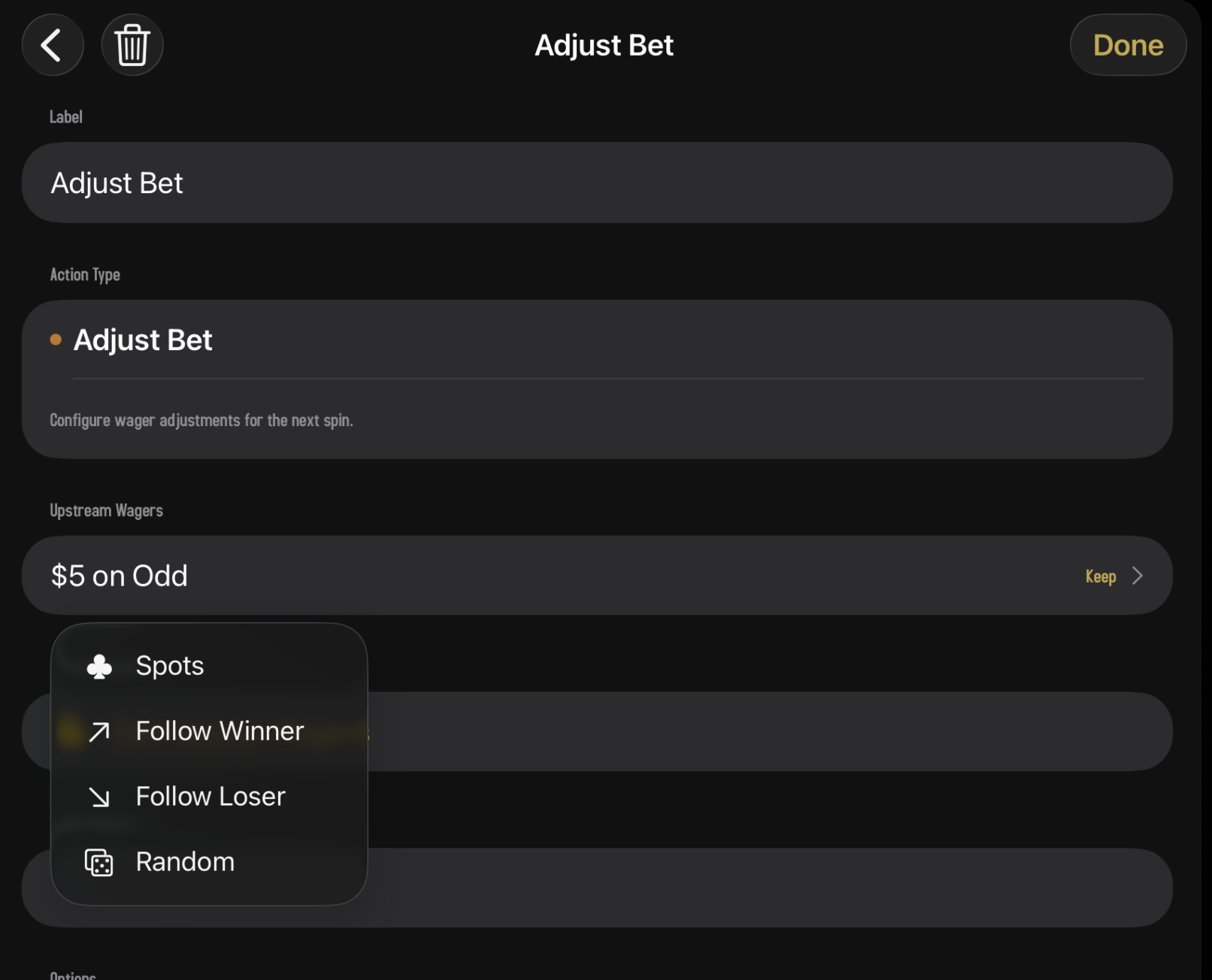
- Spots. Place specific chips on specific zones of the table. The simplest kind.
- Follow the Winner. Bet on whatever won the last spin.
- Follow the Loser. Bet on the opposite of whatever won the last spin.
- Random. Pick a random spot (or several) every spin.
Pick one to add it. You can swipe a group to delete it later, or tap it to re-open and edit it.
1 · Spots
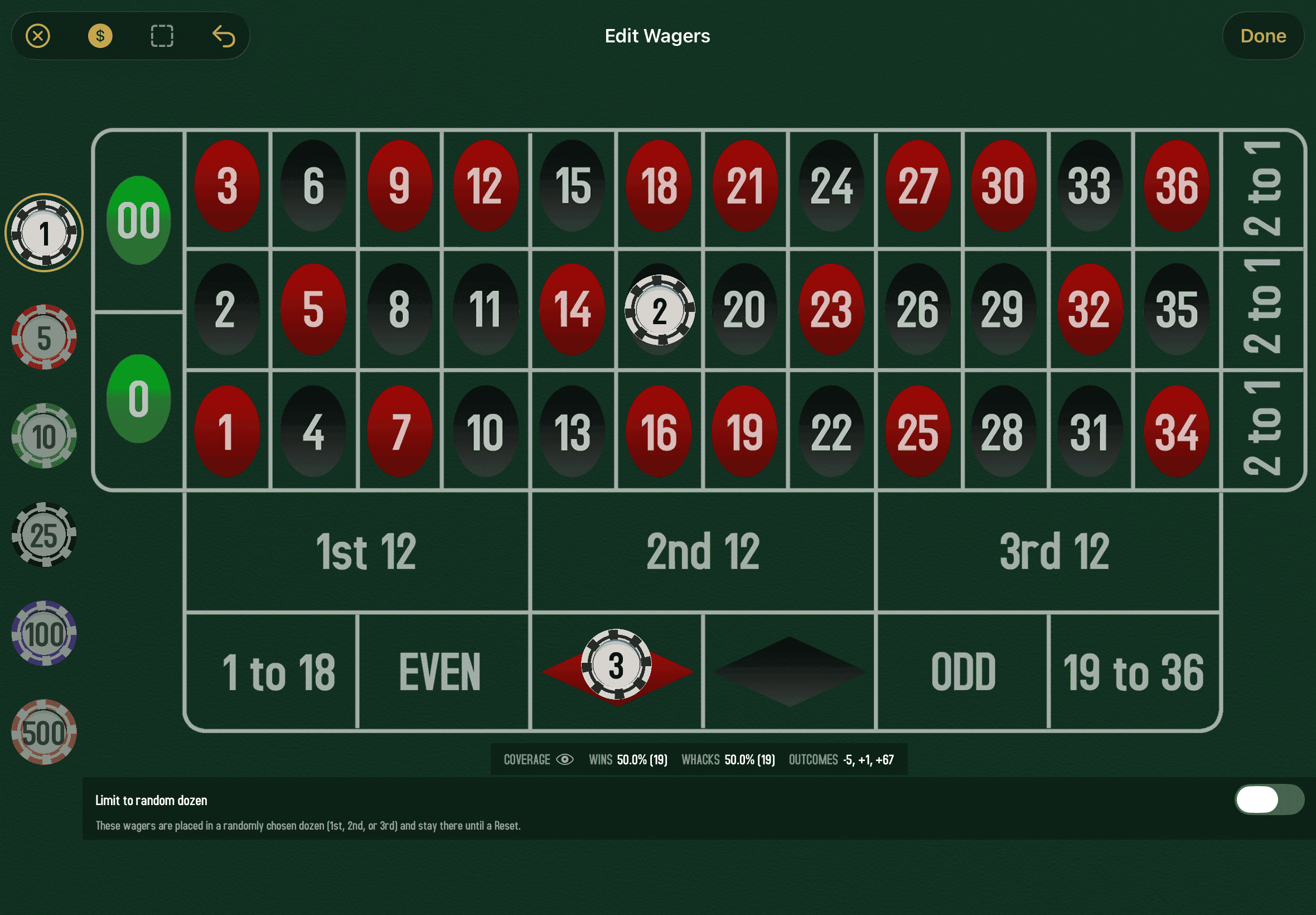
The most direct kind: you literally place chips on the roulette table. When you add a Spots group, the full Wager Editor opens up. Tap a chip denomination on the left, tap a bet zone on the right, and you've placed a wager. Stack as many as you like, and tap Done when you're finished.
What you can place
Anything the table supports: straight-up numbers, splits, streets, corners, six-lines, baskets, plus all the outside bets (red/black, even/odd, high/low, dozens, columns). For full details on every bet type, see the Wager Editor guide.
Random Dozen mode
At the bottom of the wager editor for a Spots group is a Random Dozen toggle. When you turn it on, your inside-number bets stop being fixed and start being placed in a random dozen each spin. This is for "anchor and rotate" strategies that want to play the same shape of bet but vary which third of the wheel it lands on.
2 · Follow the Winner
Bet on whatever side won the last spin. If Red came up, bet Red. If Black came up, bet Black. If a green zero came up, repeat your previous wager.
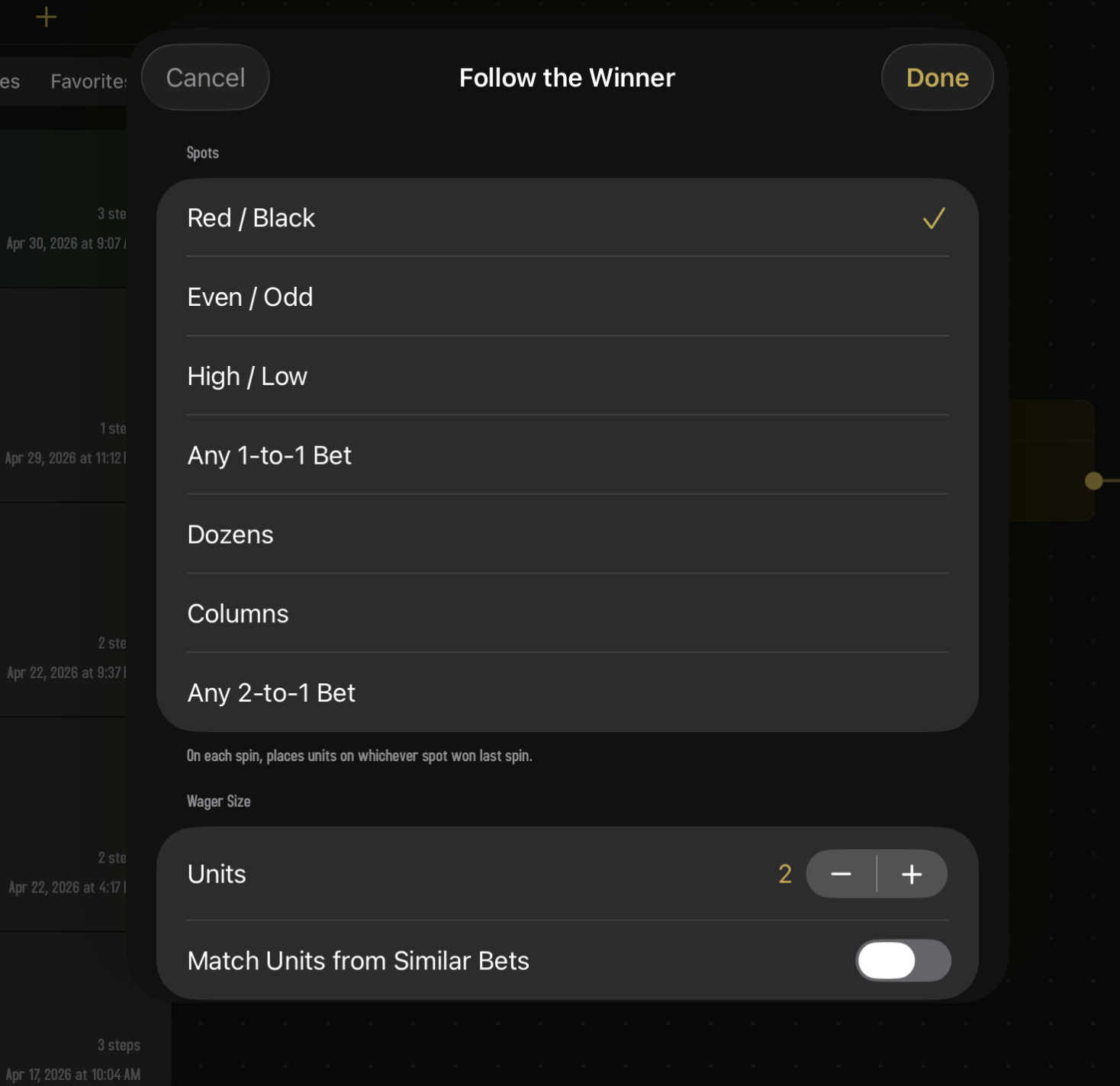
This isn't just for red/black. The bet type can be any binary or ternary outside bet:
| Bet Type | Follows what |
|---|---|
| Red / Black | The color of the last winning number. |
| Even / Odd | Whether the last number was even or odd. |
| High / Low | Whether the last number was 1–18 (low) or 19–36 (high). |
| Any 1-to-1 Bet | Pick whichever of the three above patterns is currently winning. |
| Dozens | The dozen that won (1st, 2nd, or 3rd). |
| Columns | The column the last number was in. |
| Any 2-to-1 Bet | Either Dozens or Columns, whichever is hot. |
Inspector fields
- Spots. The bet type, one of the seven options in the table above.
- Spots Count. Appears only for the three-way bets (Dozens, Columns, Any 2-to-1). Set to 1 or 2: bet just the most recent dozen, or the two most recent.
- Units. How much to wager per spot.
- Match Units from Similar Bets. A toggle. When on, this group ignores its own Units field and instead matches the bet size of any "similar" upstream wager. Useful when you want a follow group to pick up wherever the strategy currently is, rather than starting from a fixed amount.
3 · Follow the Loser
The opposite of Follow the Winner. Bet on whichever side lost the last spin. If Red came up, bet Black. If a number in the 1st dozen hit, bet a different dozen.
The inspector is identical to Follow the Winner: same bet types, same fields. Only the rule for picking is flipped.
Follow the Winner is a "ride the streak" mindset: whatever's hot, keep betting on it. Follow the Loser is a "regression to the mean" mindset: whatever just lost is due for a turn. Roulette doesn't actually have streaks or memory, of course, so neither approach has any mathematical advantage. They're just different ways to add interest to a session.
4 · Random
Picks a random spot (or several) at the start of every spin. The most flexible group, with the most options.
Inspector fields
| Field | Does |
|---|---|
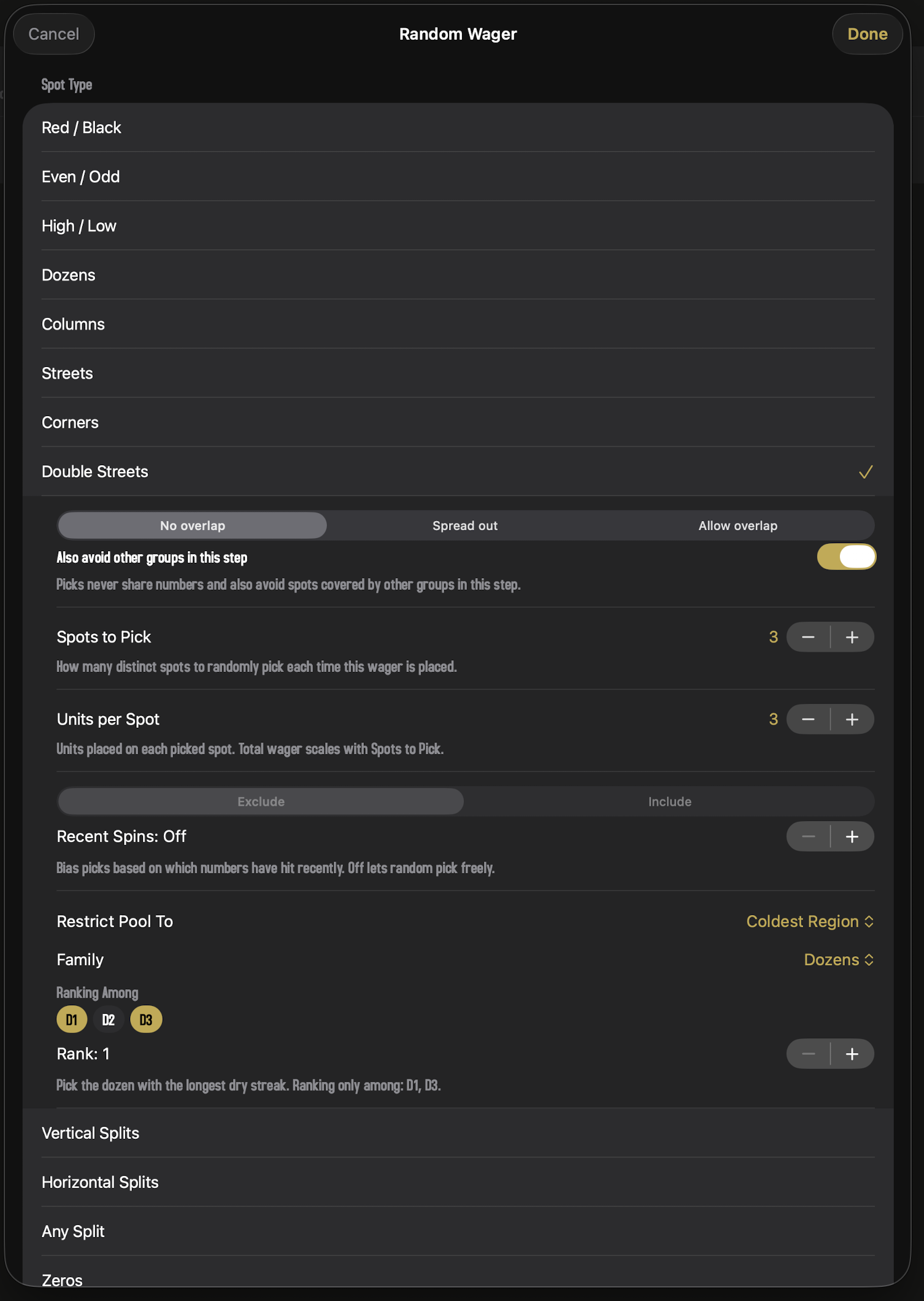
| Spot Type | What kind of zone to pick. Choices include Streets, Corners, Splits, Six-Lines, Dozens, Columns, Red/Black, Even/Odd, High/Low, Straight numbers, single numbers, and several "Any" categories. |
| Spots to Pick | How many spots to pick at random. The valid range depends on the spot type and the table. |
| Overlap | How picks share covered numbers. A three-way segmented control: No overlap (picks never share numbers; may return fewer than the requested count if the pool runs out), Spread out (picks minimize shared numbers but always fill the count), or Allow overlap (uniformly random; sharing is fine). When No overlap is selected, a sub-toggle appears: Also avoid other groups in this step. Turning it on tells this group to also dodge any numbers already covered by sibling groups in the same Step (fixed Spots, Follow, or earlier Random) — useful for, say, placing Corners on the opposite-side column boundary from a Columns wager on the same Step. Off by default. |
| Units | How much to wager per picked spot. |
| Match Units from Similar Bets | Same as for Follow groups: when on, take the bet size from a similar upstream wager instead of the field above. |
| Recent Spins | A paired control that biases random picks based on what just hit. The stepper sets how many recent spins to look at (0–20; Off when 0); the segmented control above it picks the direction — Exclude means "don't pick spots whose numbers came up in the last N spins," Include means "force the first min(N, spotsCount) picks to cover the last N winners in chronological order — pick #1 = most recent winner, pick #2 = second-most-recent, and so on; any remaining picks stay random." Set the count to Off to disable. |
| Restrict Pool To | An optional spatial restriction on the pick pool. One picker, six choices: Off (no restriction), Upstream Coverage (only pick spots whose numbers fall inside an upstream wager — useful for sub-bets that respect the parent strategy's domain), or one of four region modes: Specific Region, Any Region, Hottest Region, Coldest Region. The region modes expose a Family picker (Even-Money Bets / Dozens / Columns) and either a Member dropdown (Specific) or a Rank stepper (Hottest/Coldest). Hottest and Coldest also show a Ranking Among chip row — tap chips to narrow the ranking to a subset (e.g. "coldest of Col 1 or Col 3," skipping Col 2). All chips lit = consider the full family. See the section below for what each region mode does. Region modes only show for inside-bet spot types (streets, corners, splits, straight numbers); outside-bet types are themselves regions, so they're hidden. Upstream Coverage is hidden on the first step. |
Restrict Pool To in detail
The picker is mutually exclusive — you pick one restriction or none. Use Upstream Coverage when you want a sub-bet that stays inside whatever the previous step covered (e.g. random corners that all fall inside an upstream Dozen). Use a Region mode when you want to pin the pool to a specific zone of the table.
The region picker has three families:
- Even-Money Bets — the six 18/18 wagers: Low, High, Red, Black, Odd, Even.
- Dozens — 1st, 2nd, 3rd Dozen.
- Columns — 1st, 2nd, 3rd Column.
And four region modes that say which member to use:
| Mode | Behavior |
|---|---|
| Specific Region | Lock to one fixed member of the family — e.g. always 2nd Dozen, or always Red. The Member dropdown picks which one. |
| Any Region | Pick a uniformly-random member of the family each time the wager resolves. Useful when you want coherence (all picks share the same dozen, say) but don't care which one. |
| Hottest Region | Pick whichever family member was hit most recently. Resolved by scanning the full session spin history newest-first; the member with the smallest distance to its last hit wins. The Rank stepper lets you ask for the 2nd-hottest, 3rd-hottest, etc. The Ranking Among chip row narrows the candidate set — e.g. ranking among just two of the three columns. Every session starts with 10 pre-seeded random spins (like walking up to a table that's already in progress), so Hot/Cold has data to work with from the very first wager. |
| Coldest Region | Pick whichever family member has gone the longest without a hit (longest dry streak). Same scan, sorted the other way. Members never hit in available history get the maximum possible "distance" and tend to win Coldest rank 1 outright. The Rank stepper picks 2nd-coldest, 3rd-coldest, etc. Ranking Among works here too: drop the middle column from the chips and the coldest is picked from the two outer columns only. |
A note on Hottest with the Even-Money Bets family: every non-zero spin hits three of the six even-money bets at the same time (e.g. 22 fires High, Even, and Black all together). So Hottest, rank 1 usually ties between those three same-spin members and resolves the tie randomly. Coldest doesn't have this issue — there's normally a single member with the longest gap.
Hot/Cold scoring uses the full session history, not the Recent Spins window. Recent Spins controls its own separate exclude/include feature for individual numbers, and stacks independently with whatever Restrict Pool To is set to.
Why all the options?
Random groups can do a lot. The simplest use is "pick three random streets, $5 each." But by combining the modifiers you can build things like "pick three random corners that don't overlap and aren't covered by the last five winners." That kind of nuance is why the inspector has so many switches.
Stacking groups together
A Step can have any number of wager groups, and they all run on every spin. Three Spots, a Follow the Winner, and a Random group? Sure. The Step places all of those bets together when the wheel spins.
The order usually doesn't matter mathematically — every group runs together on the same spin — but it's what shows up on the Step's card and in the strategy description, so put the most important ones first if you care about how it reads.
One spot where order does matter: stacking two Random groups of the same type with no-overlap turned on. The later group sees the earlier group's picks and avoids them, so two Random Double Streets (2 spots each, no overlap) cover four distinct double streets instead of possibly doubling up. Different types stay independent by default — a Random Corners and a Random Double Streets in the same Step can still share numbers, since they're different bet families. If you want cross-type isolation too (say, corners that avoid an upstream Columns wager's coverage), turn on Also avoid other groups in this step under the No overlap segment. Group order then matters across types: the later group dodges everything the earlier ones covered, so put the avoider last.
The Wager Source picker again
Worth repeating since wager groups are the thing it actually controls:
- Replace. The Step ignores any wagers handed to it from upstream and uses only its own groups. Any actions further up the chain (a Martingale, an Adjust Bet) are effectively reset by reaching this Step.
- Extend. The Step keeps the upstream wagers and adds its own groups on top. Use this when the Step is supposed to add a side bet to whatever's flowing through.
Picking the right one matters a lot in strategies with progressions. Continue on to Action Nodes to see how this fits together.