
Action Nodes
Nine ways to react to a spin without spinning the wheel again.
An Action node sits between Steps and changes the wagers carried through. It's the place where progressions live: doubling after a loss, advancing a Fibonacci sequence, parlaying a winner, resetting back to base. Every classic betting "system" you've heard of is built out of these.
Actions are always one input, one output. They never split the flow; they just transform what's flowing through.
Adding an Action
Tap the + button on the toolbar, then Action, and a submenu lists every action kind. Pick one to drop a fresh node onto the canvas. Connect its input to whatever upstream node should feed into it (usually a Step's "loss" or "win" output) and its output to wherever execution should go next (usually back to the same Step, for a loop).
The shared "Re-randomize" toggle
Every action has one shared option at the bottom of its inspector: a Re-randomize toggle. When on, any random wager groups in the strategy re-pick their spots each time execution flows through this action. Useful for "pick a fresh random number every loop" patterns. When off (the default), random spots stay stable across loop iterations until something explicitly resets them.
1 · Martingale
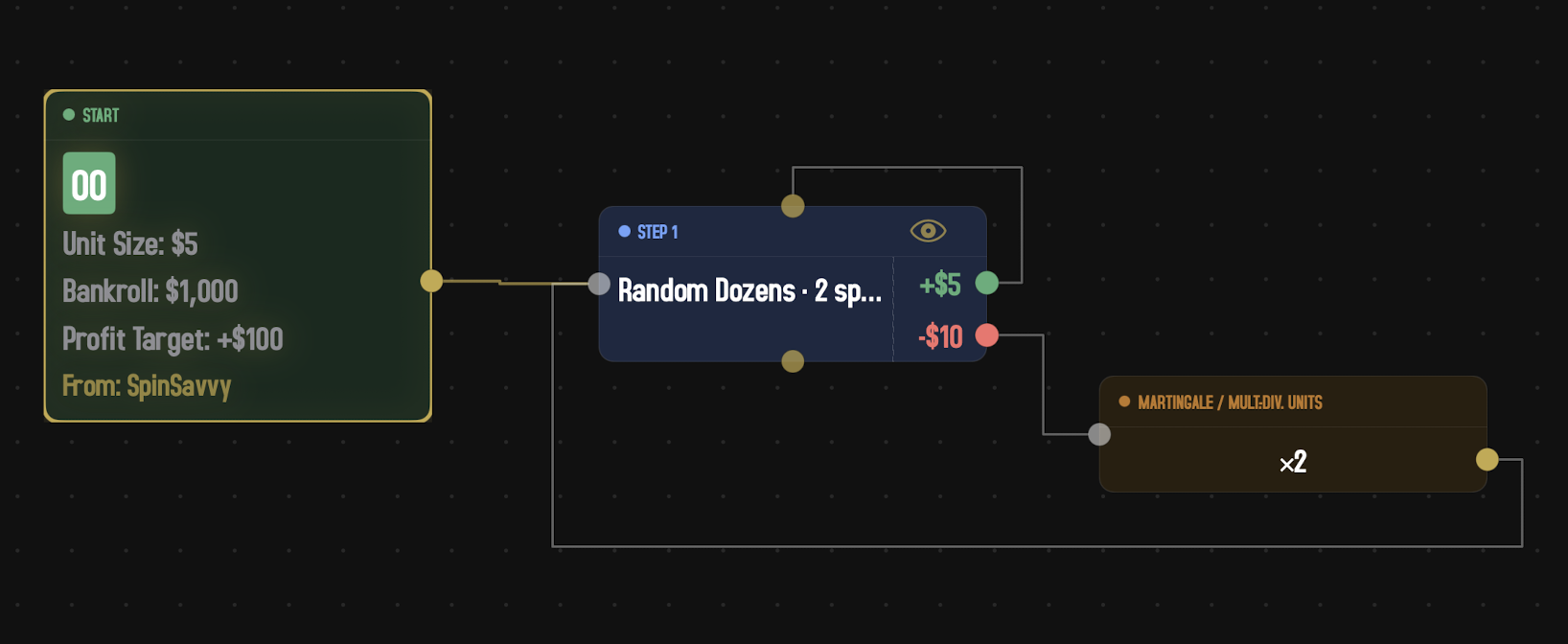
The most famous progression. After a loss, multiply your bet so that a single win recovers all prior losses plus the original profit. (In the inspector this action is labeled Martingale / Mult.-Div. Units, since the same node also covers the divide-on-win regression patterns.)
Inspector fields
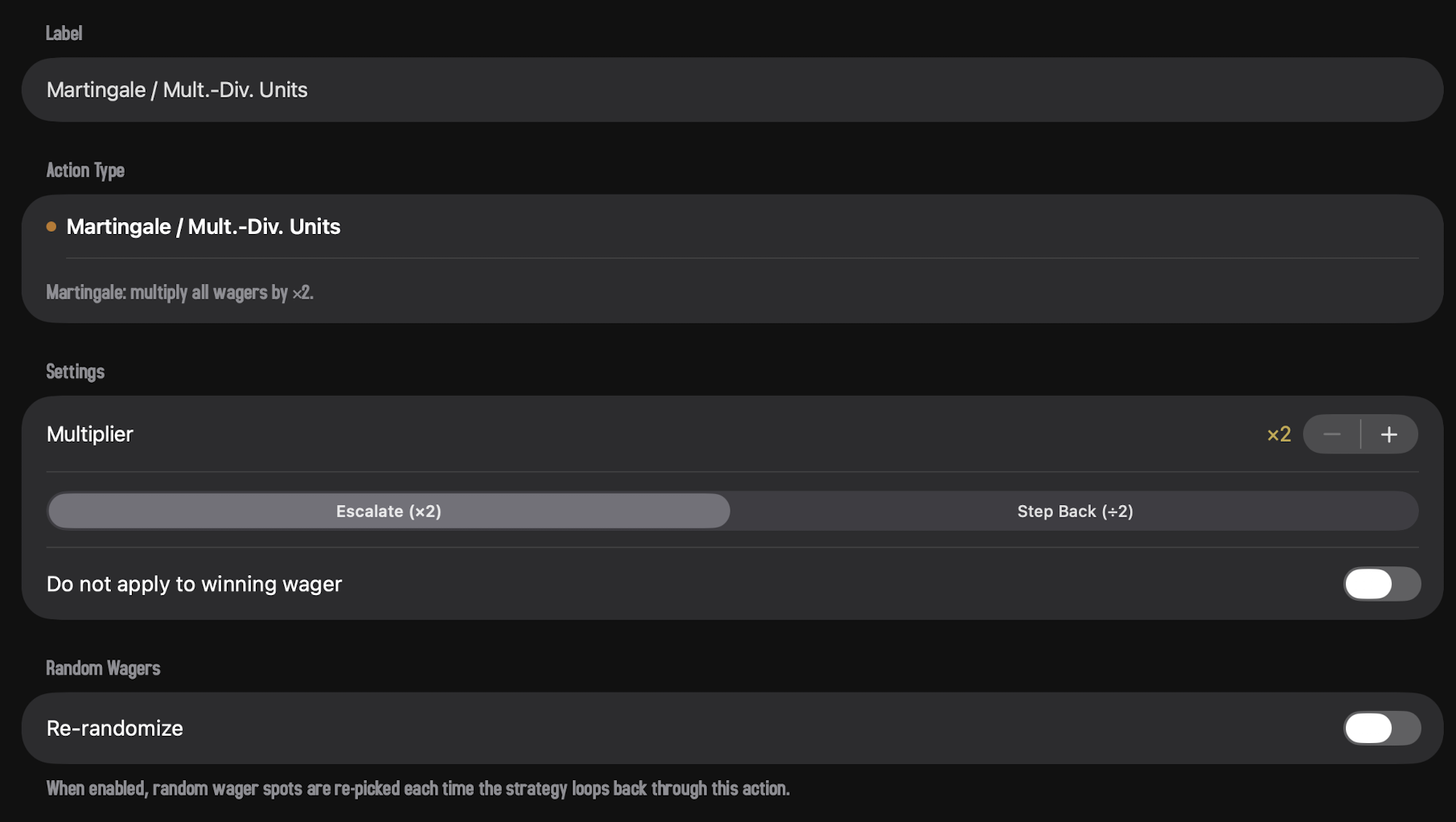
- Multiplier. Any whole-number factor from ×2 up to ×100 (the classic Martingale is ×2). Tap the stepper to dial it in; the Direction control below shows whether each fire multiplies up or divides down by that factor.
- Direction. Escalate (the classic move, e.g. ×2) or Step Back (the inverse, e.g. ÷2). Used for "regress after a win" patterns when set to Step Back.
- Do not apply to winning wager. When on, an in-flight bet that just won is excluded from the multiplication; only losing bets get progressed. Useful for strategies that have multiple bets out at once.
Card summary examples: "×2," "÷5" (when stepping back).
The Martingale sounds like it should always work, since "you only need to win once." But the bet sizes grow exponentially, you'll hit your bankroll limit or the table maximum well before the math says you should, and a long enough losing streak ruins the whole sequence. Run it through the simulator for a few hundred sessions and watch what happens. The math doesn't care that the system seems clever.
2 · Fibonacci
Walk along a Fibonacci sequence (1, 1, 2, 3, 5, 8, 13, 21…). After a loss, advance one position; after a win, retreat. Bigger steps grow more gradually than Martingale, but the same general idea applies.
Inspector fields
- Direction. Advance (move forward in the sequence) or Retreat (move backward).
- Step. How many positions to move each time. Defaults to 1 (the standard Fibonacci move). Up to 5 for more aggressive variants.
- Skip Duplicate 1. The sequence officially is "1, 1, 2, 3, 5…" but many gamblers prefer "1, 2, 3, 5…" without the duplicate first 1. Toggle to skip it.
Card summary: "Advance" or "Retreat ×2 step."
3 · D'Alembert (add or subtract units)
A gentler progression. After a loss, add a fixed number of units to your wager. After a win, subtract the same amount. Sums grow linearly instead of exponentially, so a bad run is recoverable in ways a Martingale isn't.
Inspector fields
- Units. How many units to add or subtract each time. 1 to 20.
- Direction. Add (+N) or Subtract (−N). The classic d'Alembert adds after losses.
- Do not apply to winning wager. Same idea as Martingale's. Excludes already-winning bets from the adjustment.
Card summary: "+3 units" or "−2 units" (or "+$3 / −$2" with the canvas in dollar mode at a $1 unit size).
4 · Percent Progression
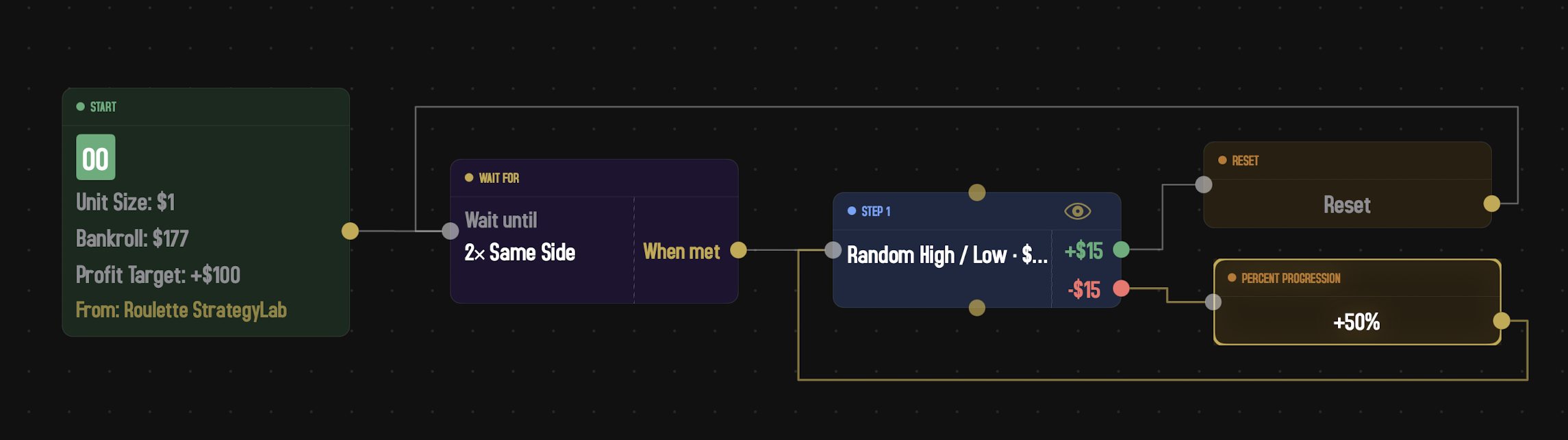
The middle ground between Martingale and D'Alembert. After each fire, scale every wager by a percentage of itself — by default +50%. A 15-unit bet becomes 22 on the next spin (15 × 1.5, rounded down), then 33, then 49, and so on. Slower than doubling, but the bet sizes still grow geometrically rather than linearly. Common in casino-floor systems that want a Martingale's recovery shape without doubling all the way up.
Inspector fields
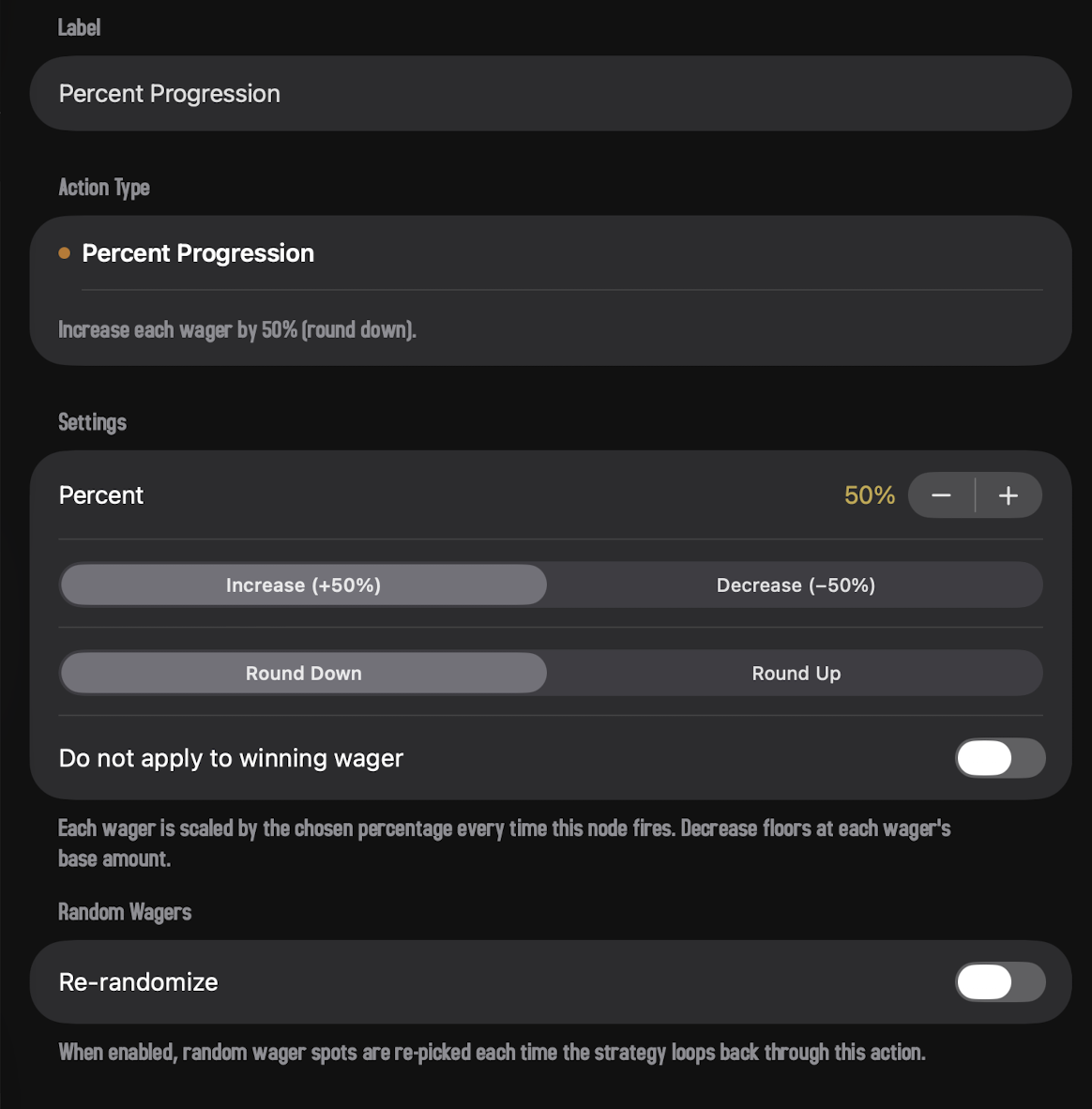
- Percent. Any whole-number percentage from 5% up to 500%, stepping by 5. The default 50% recreates the classic "press by half" progression.
- Direction. Increase scales each wager up by the chosen percent; Decrease divides it back down by the same factor (with a floor at the wager's base amount, so it can't dip below the step's starting bet).
- Rounding. The scaled amount usually isn't a whole number of units. Round Down (the default) floors it; Round Up ceils it. Either way the final wager is always at least 1 unit.
- Do not apply to winning wager. Same idea as Martingale's — exclude bets that just won from the scaling, so only losing bets progress.
Card summary: "+50%" or "−50%."
5 · Parlay
"Let it ride." After a winning spin, the winnings stay on the same wager so the next bet is bigger. Multiple winning spins in a row stack up exponentially.
Inspector fields
-
On Win. Three modes:
- Payout per Winner. Each winning bet carries forward whatever it just paid (the original stake plus the win).
- Net Profit on Winners. Only the net profit (winnings minus the bet) carries forward, on the same wagers.
- Split Net Profit on All Wagers. Take the total net profit and spread it evenly across all of the original wagers, regardless of which won.
-
On Loss. What to do with losing bets:
- Keep. Leave them at their current size.
- Reset to Base. Restore them to the original starting bet.
- Remove. Take them off the table.
(The "On Loss" picker is hidden when "Split Net Profit" is selected, since that mode covers all wagers anyway.)
Card summary: "Parlay" or "Parlay (net)" or "Parlay (split)."
6 · Reset
Restore every wager to whatever its original base amount was. Used after winning streaks (or losing streaks) to step back to the starting point.
No inspector fields beyond the shared Re-randomize toggle. Reset just resets.
Card summary: "Reset."
7 · Revert Wager
Restore the wagers to whatever they were before the most recent action that modified them. Where Reset goes back to the original base, Revert undoes one step of progression.
If there's no history to revert to (you're already at base), Revert behaves like Reset.
No inspector fields. Card summary: "Revert."
8 · Adjust Bet
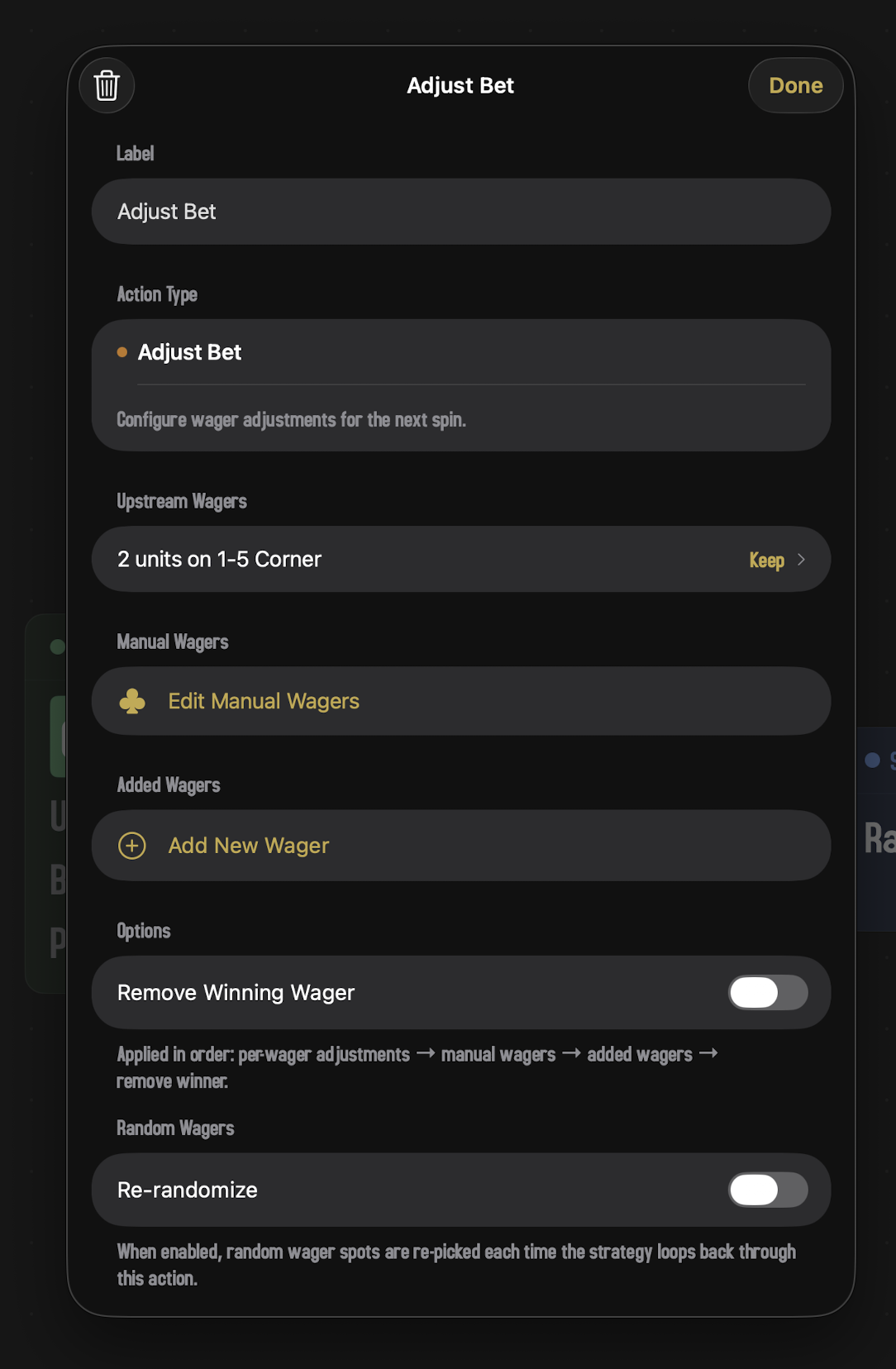
The most flexible action. Where the others apply a single rule across all wagers, Adjust Bet lets you tinker with each wager individually, plus add or remove specific bets.
Inspector fields
Upstream Wagers
One row per wager flowing into this action. Each row has an operation picker:
- Keep. Leave it alone.
- Remove. Take this wager off the table.
- × N. Multiply the units by N.
- ÷ N. Divide the units by N.
- + N units. Add a fixed amount.
- − N units. Subtract a fixed amount.
Manual Wagers
Tap Edit Manual Wagers to open the wager editor and place specific chips that get added on top of whatever the upstream wagers (after adjustment) leave you with.
Added Wagers
Like the wager groups on a Step, but applied as part of the action. You can add Spots, Follow groups, or Random groups, and their results are appended to the wager set after the per-wager adjustments and manual wagers.
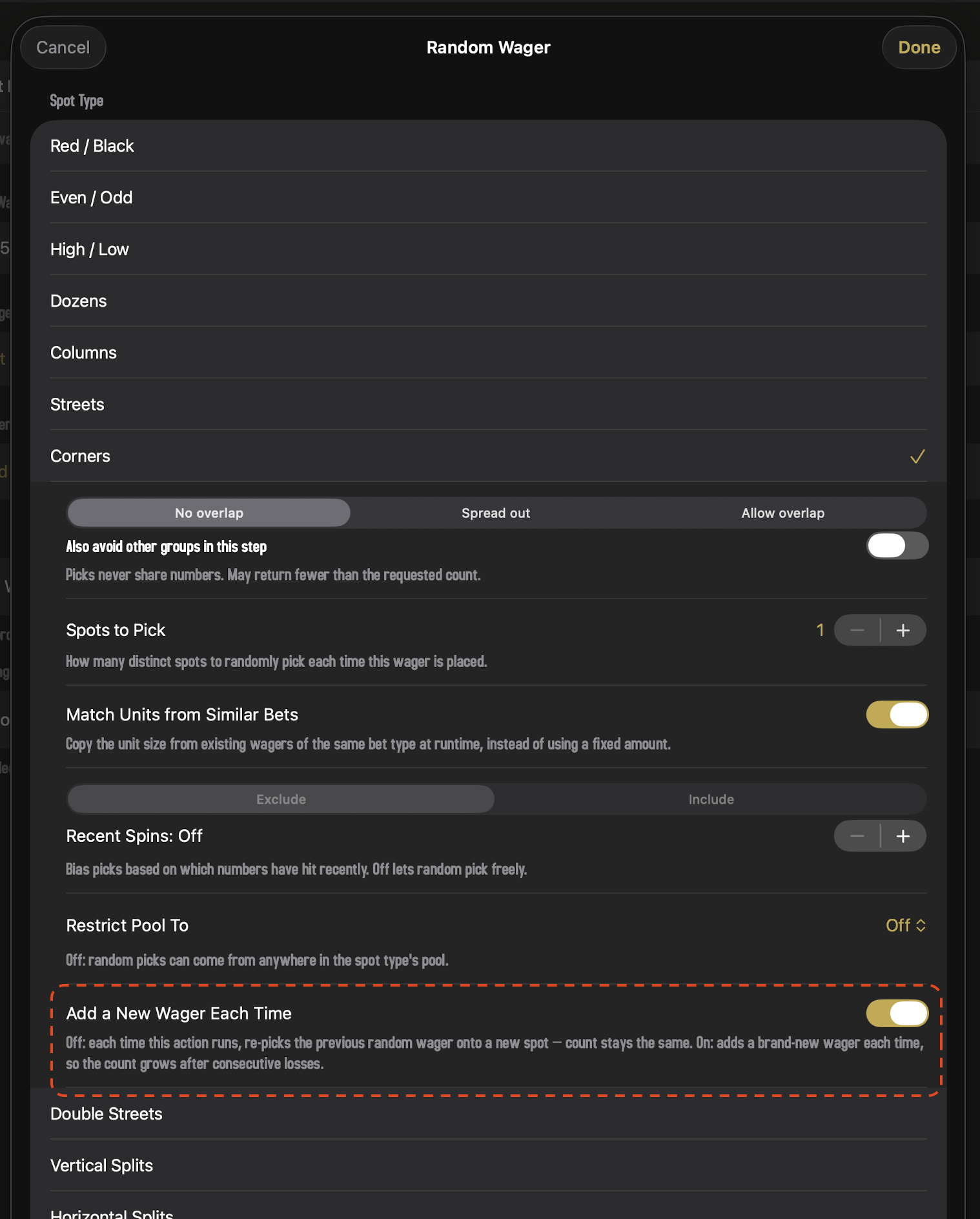
Random groups added here pick up one extra option that doesn't appear on Step random groups:
- Add a New Wager Each Time. When on (the default), every visit to this action appends a brand-new random wager to the table — so a loop that keeps coming back through Adjust Bet keeps stacking on more random bets. When off, every visit re-rolls the same wager onto a new spot, so the count stays fixed and downstream Adjust Bet operations can keep targeting the same slot. Turn it off when you want the random pick to behave like a stable wager that just moves; leave it on when you want a "build a portfolio of random bets" pattern.
Remove Winning Wager
A small toggle that, when on, removes any wager that just won from the table after this action runs. Useful for "pull profits, leave only the losers" patterns.
Order of operations
Adjust Bet runs its operations in this exact sequence:
- Per-wager adjustments (keep/remove/multiply/divide/add/subtract on each upstream wager).
- Manual wagers (specific chips you placed in the wager editor).
- Added groups (Spots, Follow, Random).
- Remove Winning Wager (if toggled on).
A short footer note in the inspector reminds you of this if you forget.
9 · Copy Wagers
Replace the current wager set with whatever a different Step in the strategy would place. Useful for "go back to the bets we made at Step 2" patterns without having to rewire the graph through that step.
Inspector fields
- Source Step. A picker showing every Step in the strategy by label. Pick one and Copy Wagers will resolve that step's wagers (running its groups under its policy) and use them as the new current set going forward.
Card summary: "Copy from Step 2."
Most strategies don't need Copy Wagers. It's a cross-reference shortcut: it lets a downstream Action borrow a Step's wager set without forcing execution to actually visit that Step (which would spin the wheel). If you're not sure whether you need it, you probably don't.
10 · Adjust Unit Size
Change the strategy's unit size on the fly. Where every other action modifies the wagers (more chips, fewer chips, different bets), Adjust Unit Size modifies the value of one chip. The chip count on each wager doesn't change, but the dollar amount does.
Inspector fields
- Operation. Add, Subtract, Multiply, Divide, or Reset (back to the strategy's starting unit size).
- Value. The number to add, subtract, multiply, or divide by. Hidden when Reset is selected.
Card summary: "+1 unit," "×2," "÷3," "Reset."
Changing the unit size changes the dollar exposure of every wager in the strategy at once. Doubling the unit size after a winning streak is a way to "press" all bets uniformly without touching individual wager amounts. Halving after a loss is a way to "ease off." Be careful with this one in long simulations; small changes compound.
11 · Reset Counters
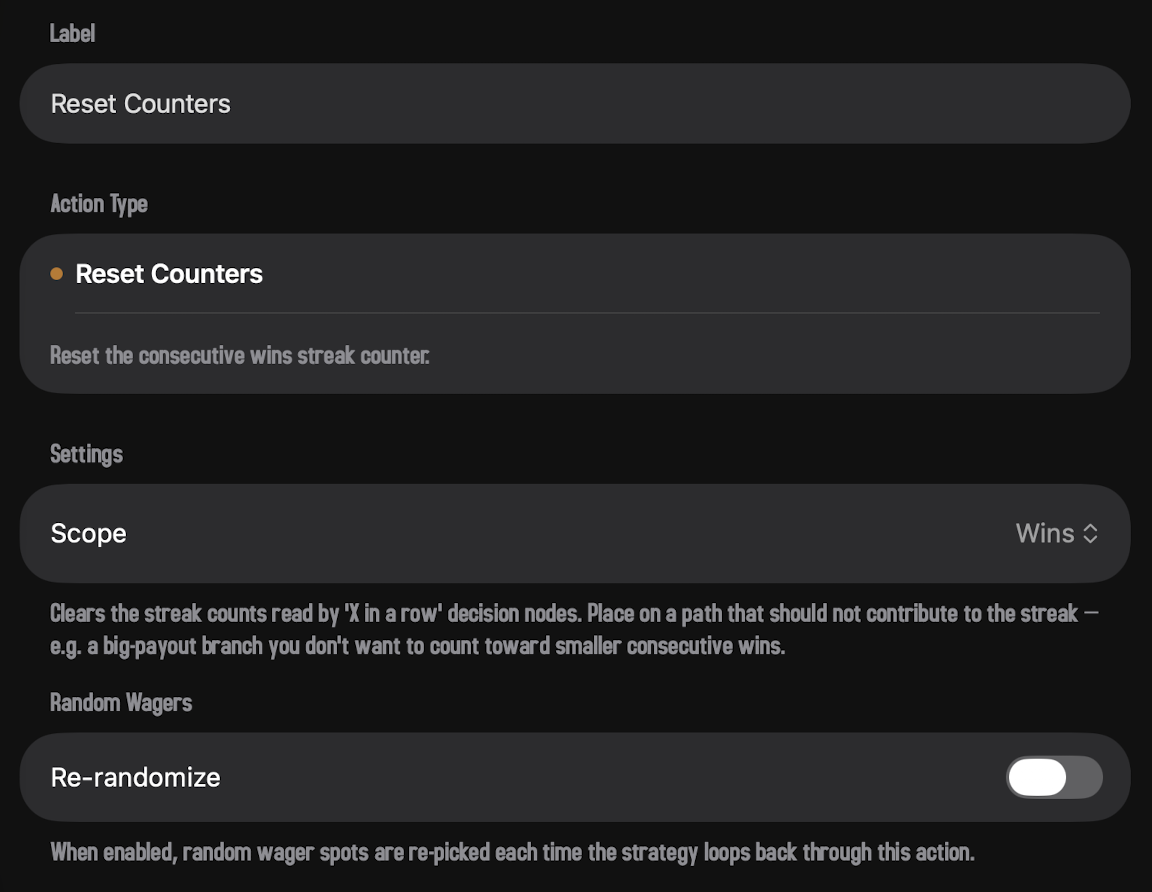
Clear the streak counts that any "X in a row" decision nodes are watching. Most actions touch wagers; Reset Counters touches the strategy's bookkeeping — the running tally of consecutive wins and losses that decisions like "3 Consecutive Wins?" use to fire.
Inspector fields
- Scope. Wins, Losses, or Wins & Losses. Picks which streak counter gets zeroed out when this action fires.
Card summary: "Wins," "Losses," or "Both."
Drop Reset Counters on a path that you don't want to feed the streak — for example, a big-payout outcome that shouldn't count toward a "three small wins in a row" check. Without it, an "X in a row" decision counts every winning spin (or every losing spin) regardless of which output port the Step routed through. Reset Counters lets a specific branch opt out of the streak.
A worked example
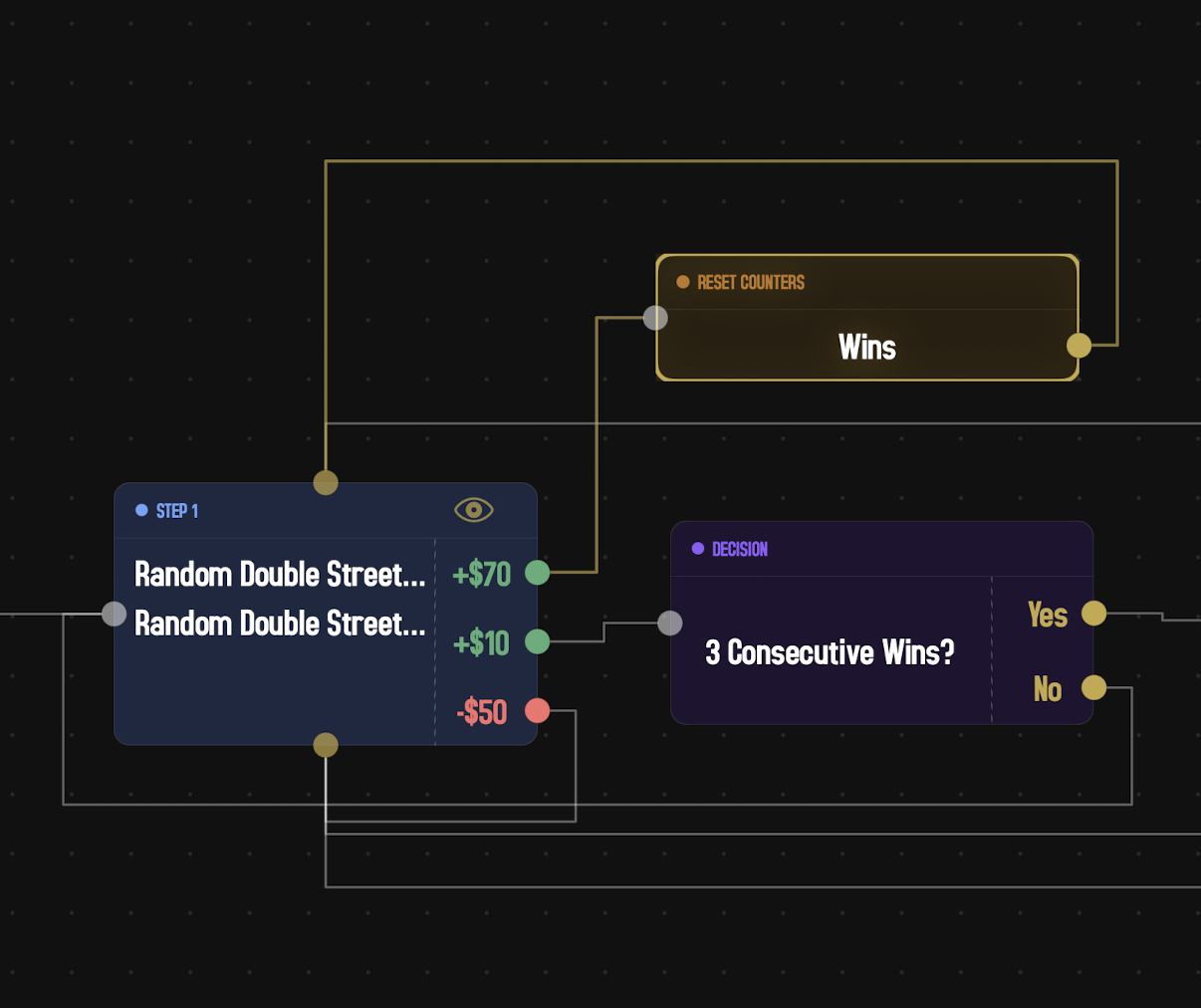
Picture a Step with two winning outcomes — a small +$10 win and a big +$70 win — feeding a downstream "3 Consecutive Wins?" decision. Without Reset Counters, the sequence +$70, +$10, +$10 trips the decision because the big win and the two small wins all count as "wins." Wire a Reset Counters action onto the +$70 path before it loops back to the Step, and the decision only fires on three small wins in a row.
Picking the right action
A quick guide to which action does what:
| If you want to... | Use |
|---|---|
| Double bets after a loss | Martingale (×2 escalate) |
| Walk a Fibonacci sequence | Fibonacci (advance) |
| Add units after a loss, subtract after a win | D'Alembert |
| Press bets by a percentage (slower than doubling) | Percent Progression |
| Let winnings ride into the next spin | Parlay |
| Go back to base bets | Reset |
| Undo just the last progression step | Revert Wager |
| Tinker with individual bets | Adjust Bet |
| Borrow another Step's wagers | Copy Wagers |
| Change the dollar value of a chip | Adjust Unit Size |
| Clear a streak so an "X in a row" check starts fresh | Reset Counters |
Any of these can be combined in a single strategy. Pretty much every interesting roulette system in the wild boils down to a sequence of these little operations stitched together.