
The Five Node Types
Five little building blocks. Anything you can imagine for a betting strategy is some combination of these.
Spin Savvy keeps the vocabulary small on purpose. Once you've learned what these five do, you've learned the whole language. Most strategies use just three of them (Start, Step, End) plus a couple of Actions for spice.
1 · Start
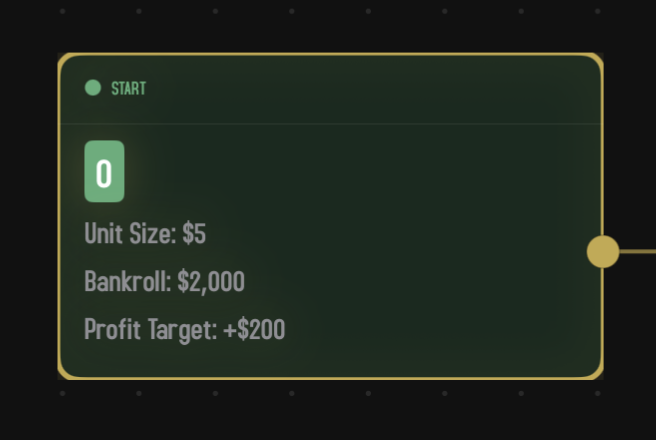
Every strategy has exactly one Start node, and you can't add another. It's the entry point: when the strategy runs, this is where it begins. Start carries the setup for the whole session: how much money you have, how big a chip is, when to stop.
Inspector fields
| Field | What it sets |
|---|---|
| Strategy Name | What this strategy is called everywhere else in the app. |
| Table Type | European (one zero), American (two zeros), or Triple Zero. Affects house edge and win probabilities. |
| Unit Size | The dollar value of one chip in this strategy. The bigger the unit size, the more each wager costs in dollars. |
| Starting Bankroll | How much money you start each session with. |
| Profit Target | How far ahead you'd be happy to walk away. Set to $0 to mean "no target, just play to max spins." |
| Max Spins | The hard ceiling. Sessions end after this many spins no matter what. |
| Table Min / Table Max | Optional. Refuse to place bets below the minimum or above the maximum. Leave blank for no limit. |
| Sources | Optional reference links (a YouTube explainer, a blog post). Show on the strategy's overview page. |
Ports
One output port on the right. No inputs (Start is always the entry point). The output goes to whichever node should run first; usually a Step.
2 · Step
The workhorse. A Step node says "place these wagers, then spin." Every Step is exactly one spin of the wheel. If your strategy has three Steps, that's not three spins; it's three different kinds of spin you might do, depending on what the graph routes you toward.
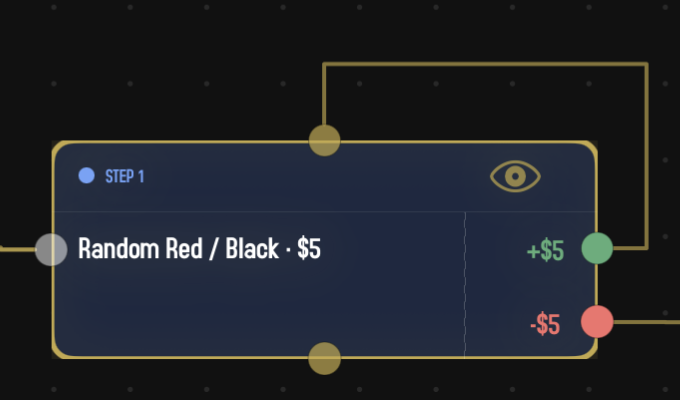
What's on the card
The left half of a Step's card is its wager list: a summary of every group of bets it places. The right half is its output ports: one port per distinct outcome the wagers could produce. Net wins are green, net losses are red, pushes (no win or loss) are blue or gray.
This means a Step's height changes as you change its wagers. Add a new bet group and the card grows to fit; remove one and it shrinks.
Inspector fields
Tap a Step to open its inspector. You'll see a few sections.
Label
An optional name for this step. By default, steps are auto-numbered ("Step 1," "Step 2," and so on) in the order they get visited from Start. If you write a custom label, that takes over.
Wager Source
Two options:
- Replace. Throw away whatever wagers came in from upstream and use only this Step's own wagers. Good for a "first" step or any step that wants to reset the betting plan.
- Extend. Keep the upstream wagers and add this step's wagers on top. Good for a step that wants to add a side bet to whatever's already in play.
The picker is hidden on the very first Step under Start, since there are no upstream wagers to inherit anyway. The default for new Steps is Replace.
Wagers
The list of wager groups attached to this step. Each group is one betting pattern: a fixed list of spots, a "follow the winner" rule, a random pick, etc. Tap Add Wager to add one and pick its type from the menu. Each group's row shows a short summary; tap to edit or swipe to delete. There's a whole page on this: Wager Groups →
Ports
One input port on the left (where execution arrives) plus optional reset ports on the top and bottom edges (less common, used by certain reset action patterns). On the right, the output ports are computed: there's one port for every distinct net outcome these wagers can produce.
For example, a step that bets $5 on Red has two outcomes (win $5, lose $5) so it has two output ports. A step that bets $3 on Red and $1 on Odd has four (red & odd, red & even, black & odd, black & even or zero) so it'll have four ports labeled +$4, +$2, −$2, −$4. The editor figures this out for you.
3 · Action
An Action does something to your wagers without spinning the wheel. Doubles your bet. Resets to base. Copies wagers from another step. Action nodes are how strategies react to wins and losses.
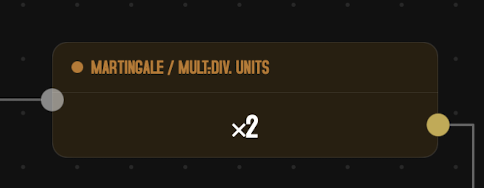
The most common pattern is: a Step's "loss" output port runs into an Action, the Action doubles the wager, and the Action's output loops back to the same Step. That's the classic Martingale.
Inspector fields
Action nodes have a kind. There are eleven of them. Each kind has its own little set of fields. A few examples:
- Martingale picks a multiplier (any whole number from ×2 up) and a direction (escalate or step back).
- Adjust Bet shows a per-wager menu where you can keep, remove, multiply, divide, add, or subtract on each wager individually.
- Copy Wagers just shows a picker of all your other Step nodes and grabs the wagers from the one you choose.
- Reset has no fields at all; it just resets.
For all of them, full details are on the dedicated Action Nodes page.
Ports
One input port on the left, one output port on the right. Actions are always one-in, one-out: they don't branch the strategy, they just transform it.
4 · Decision
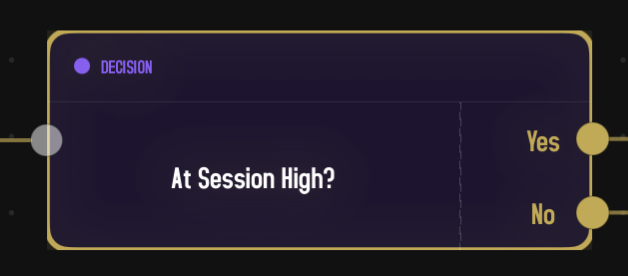
A Decision asks a yes-or-no question about the current state of the strategy and routes accordingly. "Are we covering more than 12 numbers right now?" If yes, go this way. If no, go that way. Decisions are how strategies become genuinely adaptive.
Inspector fields
Like Actions, Decisions have a kind. There are eight:
- First Win After a Loss?
- Covering X Numbers? (with comparison and threshold)
- At Session High? (with optional tolerance %)
- Compare Profit? (with comparison and a signed dollar value)
- Compare Spin Net? (with comparison and a signed unit value, watches the round's combined net)
- Every N Units of Profit? (fires once each time profit climbs into a new $N band)
- N Consecutive Wins or Losses? (with count and direction)
- Router — a special dispatcher (with rule and reset toggle, single output)
Each kind has its own little set of parameters. Full details on the Decisions and Flow page.
Ports
One input port on the left, two output ports on the right: Yes and No. You can't add or remove ports; condition Decisions are always two-way splits.
The Router kind is the exception: it has a single output port, and you draw multiple outgoing connections from that one port. At runtime it picks one of those connections per visit. See the Decisions and Flow page for the full rules.
5 · End
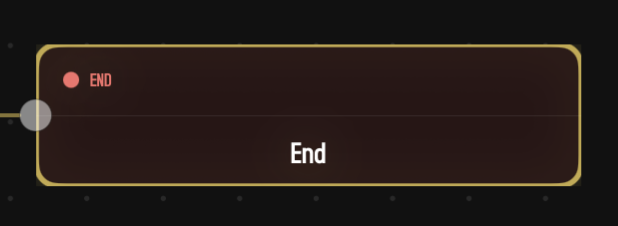
End nodes are exits. When execution reaches an End, that session is over.
Inspector fields
None. End nodes don't have any settings; they just exist to be a destination.
Ports
One input port on the left, no outputs. (Outputs would be meaningless: the session has ended.)
How many End nodes?
You can have as many as you want. A strategy might have one End for "hit the profit target," another for "max spins reached," and another for "an unusual condition fired." They're all valid endings; the strategy just routes to whichever one applies. Most strategies have one or two.
Putting it together
The five node types form a flow:
- Start sets up the session.
- Execution flows along connections to a Step.
- The Step places its wagers, the wheel spins, the result is computed, and execution leaves through whichever output port matches the outcome.
- From there, execution may pass through one or more Action or Decision nodes (these don't spin the wheel, they just transform or branch) before arriving at the next Step.
- That Step spins again.
- Eventually the flow reaches an End, or you hit max spins, or your bankroll hits zero, and the session is over.
That's it. Read on for the details on the wagers a Step can place, the actions, and the decisions.