Decisions & Flow
How a strategy walks the graph, branches on conditions, and ends.
Once you understand the node types, the wager groups, and the actions, the only thing left is how it all moves. How does the strategy decide which output port to follow? When does a Decision branch fire? When does a session actually end? That's this page.
The execution loop, in plain English
Here's what happens, spin by spin, when a strategy is running:
- Execution starts at the Start node and follows its single output connection.
- If the next node is an Action or a Decision, no spin happens; the action transforms the wagers, or the decision picks an output port. Execution keeps walking.
- The first Step reached places its wagers and spins the wheel. The wheel produces a number.
- The wagers are evaluated. The Step computes a net result (e.g., +$5, −$10, even).
- The Step finds the matching output port for that result and follows the connection coming out of it.
- Execution lands at the next node (Action, Decision, Step, or End) and the cycle repeats.
- The session ends when execution reaches an End, when bankroll hits zero, when the profit target is hit, or when the strategy's max-spins ceiling is reached.
That's the whole engine. Once you've internalized "Step = spin, Action = transform, Decision = branch, End = stop," the rest is just connecting the dots.
How a Step picks its output port
This is the part that trips beginners up at first.
A Step's output ports represent the distinct net outcomes the wagers can produce. If the Step bets $5 on Red, there are two outcomes (win $5, lose $5), so two ports. Stack a second wager on top and the picture gets richer: each independent win/lose combination across the wagers becomes its own port.
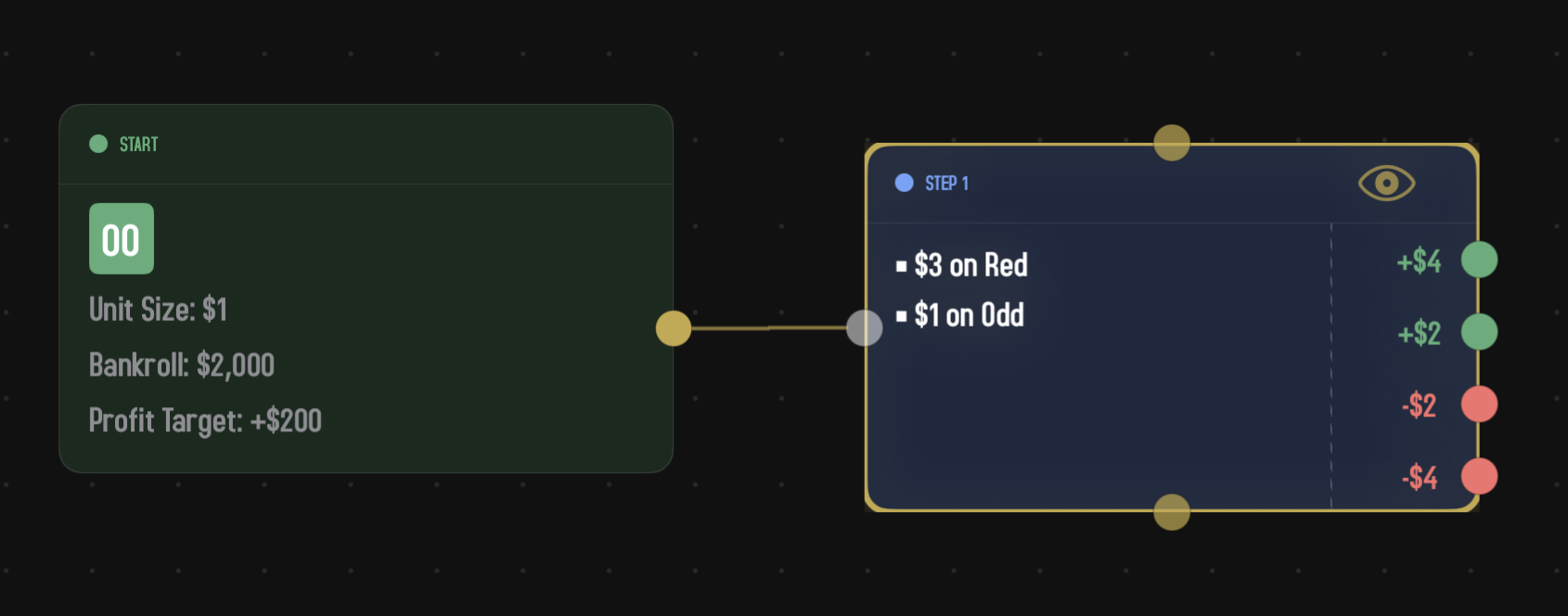
Take a Step that bets $3 on Red and $1 on Odd. The two wagers overlap (some numbers are both red and odd, some are red but even, and so on), and the stakes are different sizes, so four distinct nets are possible:
- +$4 when the spin is red and odd (both wagers win).
- +$2 when the spin is red and even (Red wins, Odd loses).
- −$2 when the spin is black and odd (Red loses, Odd wins).
- −$4 when the spin is black and even, or lands on a green zero (both wagers lose).
When the wheel actually spins, the Step computes the real net for whatever number came up, then finds the port whose label matches that net. That's the port execution follows.
This is why an unconnected output port is a dead end: if the wheel produces a result that should follow that port and there's no connection, the strategy doesn't know what to do.
Decision nodes
Steps branch by outcome (numerical net). Decisions branch by condition. They ask a yes/no question about the current state of the strategy and route accordingly.
There are six kinds of Decision in Spin Savvy. Two more nodes — Wait For and Router — live on the Decision menu but work a little differently. We'll cover the six condition decisions first, then Wait For (it pauses execution until a spin pattern appears), then the Router (a one-to-many dispatcher).
First Win After a Loss?
True if the most recent spin won and the spin before it lost. Useful for "wait for a winning recovery, then do something" patterns.
- Inspector fields. None.
- Outputs. Yes / No.
Covering X Numbers?
True if the current wagers cover at least (or at most, or exactly) some number of pockets on the wheel. Useful for "cap the coverage" patterns: if your wagers are getting too spread out, branch out and reset.
- Inspector fields. Comparison operators (">," "≥," "<," "≤") and a threshold (1 to 36).
- Outputs. Yes / No.
At Session High?
True if your current bankroll is at or above the highest it's ever been this session — optionally with a tolerance, so you're still considered "at session high" if you've drifted a little below the peak. Useful for "lock in the gains" patterns: every time you hit a new high, do something protective.
- Inspector fields. Tolerance (0–100%). At 0% the decision fires only when you're exactly at or above the peak (the strict reading). Crank it up and it forgives drift: at 10%, profit ≥ peak × 0.9 still counts.
- Outputs. Yes / No.
Compare Profit?
True if your session profit (or loss) passes a comparison against a fixed dollar amount you set in advance. Where At Session High? tracks a moving peak, this one watches against a hard number. Useful for absolute thresholds — "stop if I'm down more than $100," "do something special once I'm up $50."
- Inspector fields. Comparison operators (">," "≥," "<," "≤") and a profit value. The value is signed: enter a negative number to express loss thresholds (e.g.
< −$100). - Outputs. Yes / No.
Compare Spin Net?
True if the combined net of the most recent spin passes a comparison against a fixed unit value. Where Compare Profit? watches the running session total, this one watches just the round that just finished — the sum of units across every Step that fired together. Mostly useful for parallel-branch strategies where multiple Steps spin in the same round and you want to branch on whether the round, as a whole, was a net winner or loser.
- Inspector fields. Comparison operators (">," "≥," "<," "≤") and a signed unit value (−100 to +100). Negative values express round-level loss thresholds (e.g. "spin net < −5 units").
- Outputs. Yes / No.
Every N Units of Profit?
True once each time your session's all-time profit reaches a brand-new milestone of N units — first $20 of gains, then $40, then $60, and so on. Where Compare Profit? stays True forever once the threshold is met, this one fires once per milestone and then resets, ready for the next one up. Built for the family of strategies that say "every $20 of profit, reset your wager and start over."
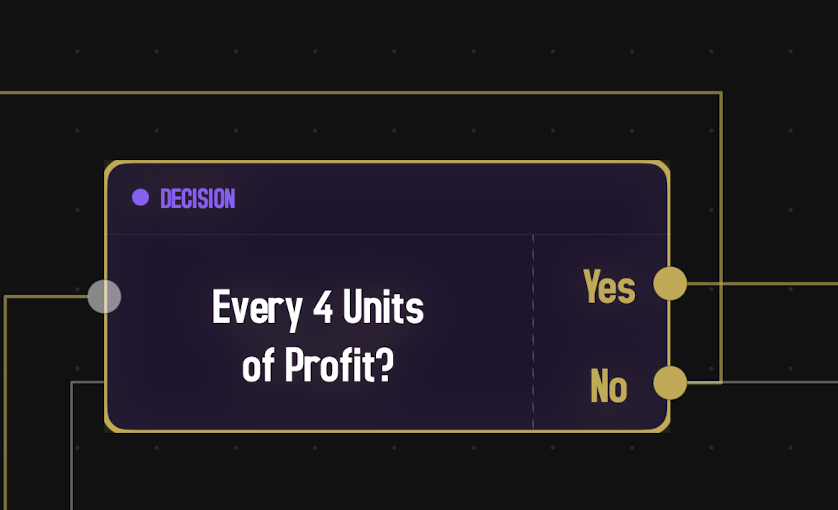
- Inspector fields. A single Every field where you set the interval. Enter it in whichever unit the canvas is set to display — dollars or units. The value is stored in units, so if you change the strategy's Unit Size later, the dollar equivalent rescales automatically (4 units = $20 at Unit Size $5, $40 at Unit Size $10).
- Outputs. Yes / No.
Yes fires the spin that first reaches a milestone, not every spin you're sitting past it. After it fires at $20, it won't fire again until profit reaches $40. If a single spin jumps two milestones at once (say, +$45 in one round), Yes fires once, not twice.
The trigger only moves forward. If profit climbs to $63 and the decision fires at $20, $40, and $60, then drops back to $38, and then climbs again to $42 — Yes does not refire. You've already hit $40 once this session, so the next trigger is whenever profit reaches $80 for the first time. Drawdowns and re-crossings of milestones you've already reached don't retrigger.
This decision only watches profit climbing up. Drops in profit don't fire it, and crossing back to break-even from a loss doesn't either — the first milestone is $20 of actual gains, not just being whole again. If you want to react to losses, use Compare Profit? with a negative value.
The classic use is to wire Yes back to a Reset action so each new $20 profit milestone wipes your wager progression and starts over from the base bets. Wire No back to the Step you're already on so play continues unchanged until the next milestone.
N Consecutive Wins or Losses?
True if the last N spins were all wins (or all losses). The classic streak detector.
- Inspector fields. Result picker (Wins or Losses), Count stepper (1 to 10), and a "Reset count after Yes" toggle.
- Outputs. Yes / No.
The "Reset count after Yes" toggle, when on, restarts the streak counter every time the Yes branch fires. So a "5 consecutive wins" decision with the toggle on will fire on the fifth, tenth, fifteenth win in a row, instead of every win after the fifth.
By default, the streak counter watches every winning (or losing) spin, regardless of which output port the Step routed through. If you want one outcome to not count — for example, a big-payout port that shouldn't lump in with a "three small wins in a row" check — drop a Reset Counters action on that path. The streak restarts from zero the next time the decision evaluates.
Decisions don't cost a spin. They evaluate instantly, in between Steps. You can chain several Decisions together to build a compound condition (this AND that AND not-the-other) and the strategy just walks through them all in one tick.
Wait For
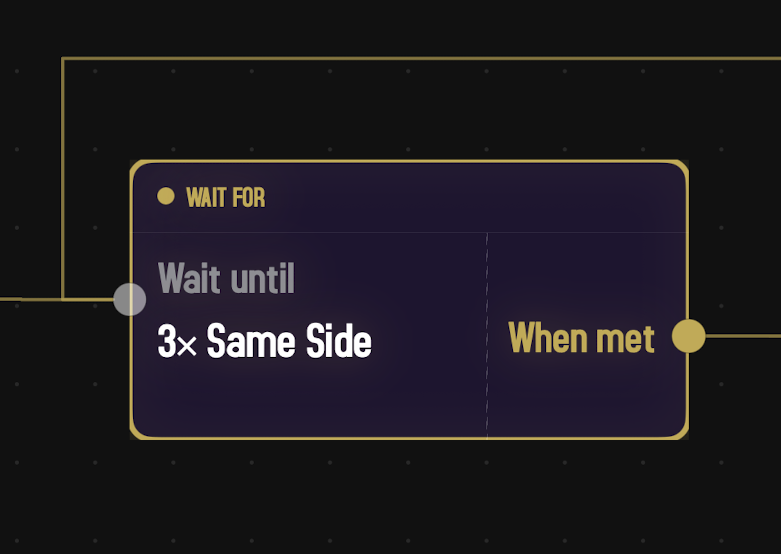
A Wait For node parks the strategy: it watches spins as they happen but doesn't place any wagers. As soon as the most recent N spins match the pattern you've chosen, play resumes and the strategy starts placing wagers again on whatever Step it's wired to. Use it when you want to bet only after the wheel has done something specific — three reds in a row, two spins in the same dozen, whatever your system keys off.
To add one, tap the + button in the canvas toolbar, open Decision Node, and pick Wait For… at the bottom of that submenu. It's grouped with Decisions because both nodes pause to check spin history — Decisions branch on the answer, Wait For just holds until the condition is satisfied.
Inspector fields
- Pattern. The shape the recent spins must form. Grouped into four families:
- High / Low: All Low (1–18), All High (19–36), Same Side (High/Low).
- Color: All Red, All Black, Same Color (Red/Black).
- Parity: All Odd, All Even, Same Parity (Odd/Even).
- Dozen / Column: Same Dozen, Same Column.
- Spins. How many recent spins all have to match — 2 to 10 in a row.
"All X" patterns require every spin in the window to be X (e.g. all three of the last three are red). "Same" patterns just require the spins to agree with each other, regardless of which side they fall on (e.g. three spins all in the second dozen, or three spins all on the same color whether that's red or black).
0, 00, and 000 don't belong to any color, dozen, column, high/low, or parity bucket. If a zero shows up inside the window, the pattern is broken and the counter starts over from the next spin. This is true for every Wait For pattern.
Ports
One input port on the left, one output port on the right labeled When met. There's no "still waiting" port — the node simply stays parked, watching each spin go by, until the condition is satisfied. If you need a time-out or fallback path, build it with a Decision (e.g. consecutive losses, max spins via Compare Profit, etc.) before or after the Wait For.
Bankroll and spins
While a Wait For is parked, no wagers are placed, so the bankroll doesn't move. But each observed spin still counts against the strategy's Max Spins budget: a Wait For that never sees its pattern will eventually exhaust the session.
Router
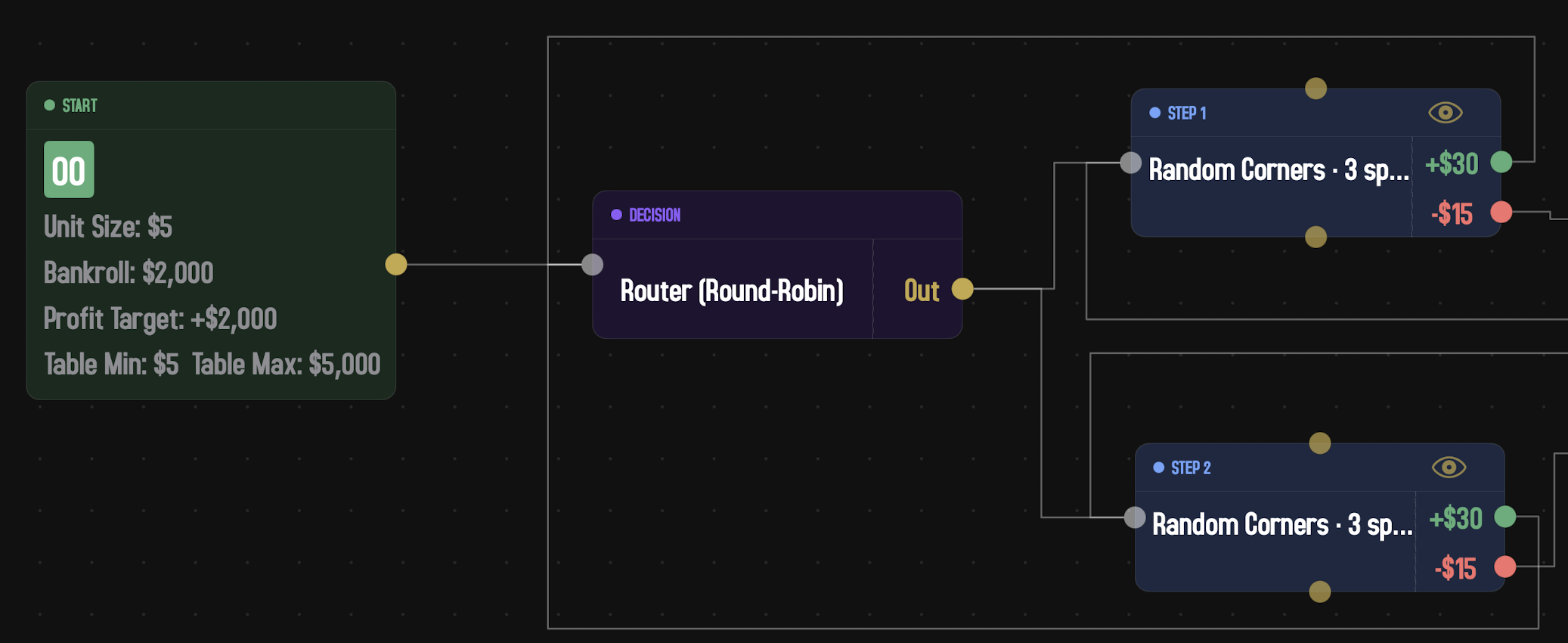
A Router lives on the Decision menu but isn't a Yes/No condition — it's a dispatcher. Where every other Decision has two output ports and picks one based on truth, a Router has a single output port from which you can draw multiple outgoing connections. Each time the strategy reaches it, the Router picks one of those connections to follow.
Use a Router when you want a strategy to alternate between several behaviors — three different opening Steps, two different recovery sequences, a randomized choice between two parallel sub-graphs.
Inspector fields
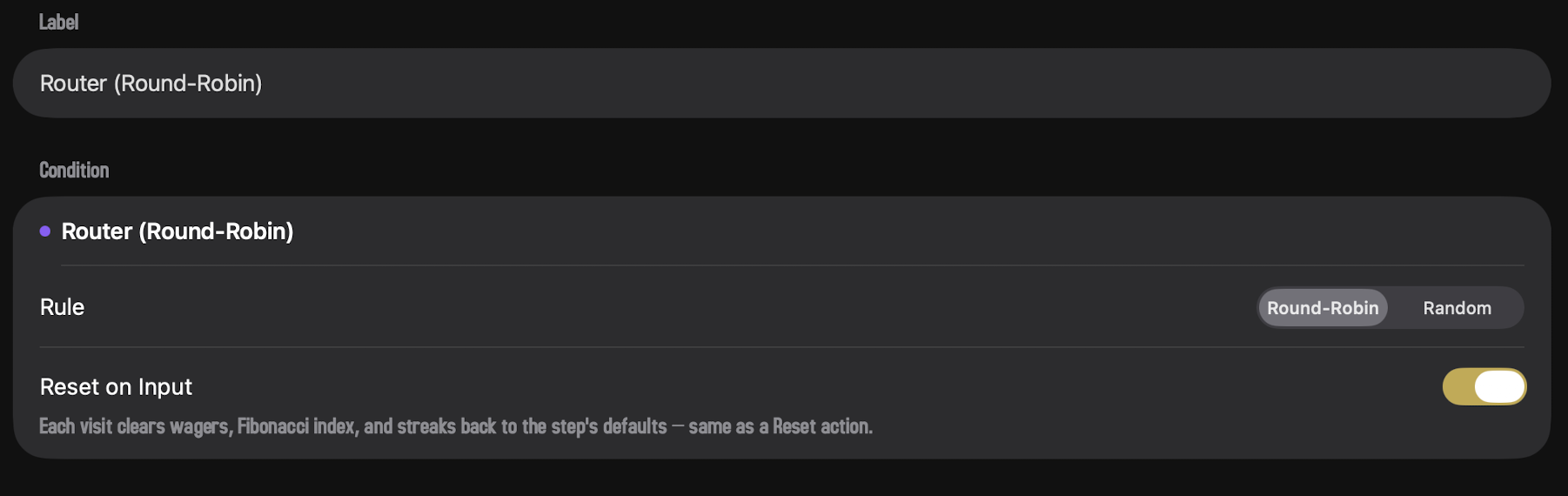
- Rule. How the Router picks among the outgoing connections.
- Round-Robin. Cycle through the connections in order, advancing one per visit. Fair and deterministic.
- Random. Pick one connection uniformly at random each visit. Independent draws; no memory.
- Reset on Input. When on (the default), every visit clears wagers, the Fibonacci index, and streak counters back to the step's defaults — same effect as a Reset action. This way each downstream branch starts clean instead of inheriting state from the previous branch. Turn it off only if you specifically want progressions to carry across Router visits.
Wiring it
Drop a Router onto the canvas and connect its single input. Then draw multiple connections from its single output port — each goes to whichever node should be one of the alternates. The dead-end check counts a Router as wired as long as it has at least one outgoing connection.
How execution ends
A session ends in one of four ways. Every session ends one of these ways; there's no other exit.
1 · Reaching an End node
Execution flows into an End node. The session is over. This is the most "graceful" exit, and the one your strategy designs for. Most strategies have one or two End nodes.
2 · Hitting the profit target
If the Start node has a profit target greater than zero, Spin Savvy watches your running bankroll. The moment it crosses the target, the session ends with a successful "you won" message. Set the profit target to $0 to disable this and let the strategy run until something else stops it.
3 · Going bankrupt
If your bankroll drops to zero, or you can't afford the next bet the strategy calls for, the session ends. In Play Mode, you'll be offered the option to reset and continue. In Simulation, the run ends and shows up as a bust on the results screen — the Exit Reasons strip there splits true Bankrupt (bankroll hit zero) from Can't Afford (bankroll above zero but too small for the next wager) so you can tell which failure mode the strategy is hitting.
4 · Hitting max spins
The Start node's "Max Spins" field is a hard ceiling. Once that many spins have happened, the session ends regardless of where in the graph execution currently sits. Useful as a safety net so an infinite loop doesn't run forever.
The dead-end check
Before running any strategy, Spin Savvy looks for nodes whose output ports aren't connected. If it finds any, it refuses to run and shows you which nodes are unfinished.
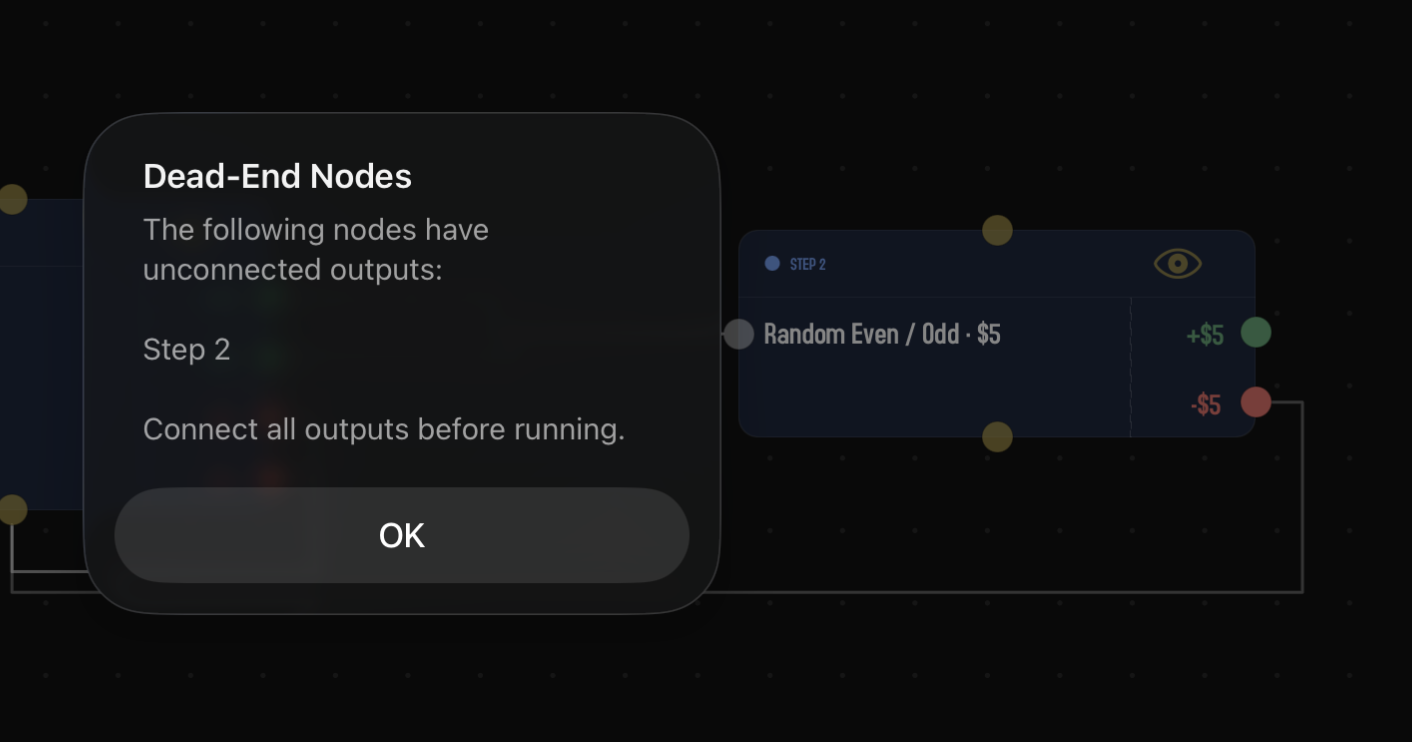
This check runs when you tap Play or Sim from anywhere in the app: the strategy overview screen, the graph editor's toolbar, or the home screen's Play button. There's no way to bypass it; the dead end has to be wired up first.
Why so strict? Because once play starts, there's no graceful fallback. If the wheel produces an outcome and your strategy doesn't have a connection for it, the only sensible behavior is to stop, and stopping mid-session would be confusing. Better to catch it before the session starts.
Loops are normal
It's worth saying again: loops are not a problem. A connection from a Step's output back to the same Step's input (often through an Action that doubled the wager) is the bread-and-butter of betting strategies. Spin Savvy handles loops naturally; it doesn't try to detect them or warn you.
The only time loops cause trouble is if a strategy could loop forever without spinning. Since Steps are the only nodes that spin, a loop made entirely of Actions and Decisions with no Step in it would just spin in place. Spin Savvy doesn't actively prevent this, but it's almost impossible to design accidentally; you'd have to be working pretty hard to set one up.
Parallel branches
It's also possible to have multiple connections leaving the same output port (or, more usually, the same node has multiple outputs that go to different parts of the graph). When play flows down both branches at once, the strategy is running them in parallel: each branch keeps its own wagers and runs independently.
Parallel branches are an advanced pattern. They're powerful for strategies that want to run multiple independent betting sequences side by side, but they can also be confusing because the bankroll is shared while the wagers are not. Most strategies don't use them. If you're new, stick to single-track designs until you've got a feel for how strategies run.
That's the engine
You now know everything about how the graph runs. The last page in this section is a hands-on walkthrough: building a real, working strategy from a blank canvas.