
Build Your First Strategy
From a blank canvas to a working Martingale on Red. Twenty minutes, give or take.
Reading about node types is one thing. Wiring one up yourself is what actually makes it click. This page walks through building a simple Martingale on Red from scratch. By the time you're done you'll have configured a Start node, added a wager, drawn loop connections, set up an action, and run a simulation.
Then you'll know.
The simplest betting "system" in roulette: bet a single chip on Red. If you win, great, bet the same again. If you lose, double the bet and try again. Keep doubling until you eventually win, at which point you've recovered all losses plus the original profit. Then start over.
It feels foolproof. It is not foolproof. We'll see why when we run the simulation.
Step 1 · Create a new strategy
Open the app, tap Strategies, then tap the + button in the top-right of the strategy list.
A blank strategy is created and a sheet pops up so you can fill in the basics before you ever see the canvas. Set:
- Strategy Name: "Martingale on Red."
- Table Type: Single Zero (European, the lowest house edge of the three).
- Unit Size: $1 (small and easy to follow).
- Starting Bankroll: $200.
- Profit Target: $20 (a 10% target; modest and reachable).
- Max Spins: 200 (a generous ceiling).
- Table Min / Max: Leave blank for now.
Tap Done. The sheet dismisses and the graph editor pushes in. You'll see two nodes already on the canvas: a green Start node and a blue Step node, connected by a single line. The Step has no wagers yet, just a "No wagers" placeholder. End nodes aren't part of the default; they're optional and only needed for strategies that want an explicit exit, so we won't use one here.
If you want to experiment with a different stake later, just edit Unit Size on the Start node. Bankroll and profit target rescale automatically so the unit count stays the same — drop a $10 unit to $1 and a $200 bankroll becomes $20, with a $20 target becoming $2. The strategy still bets the same number of units; only the dollar scale changes.
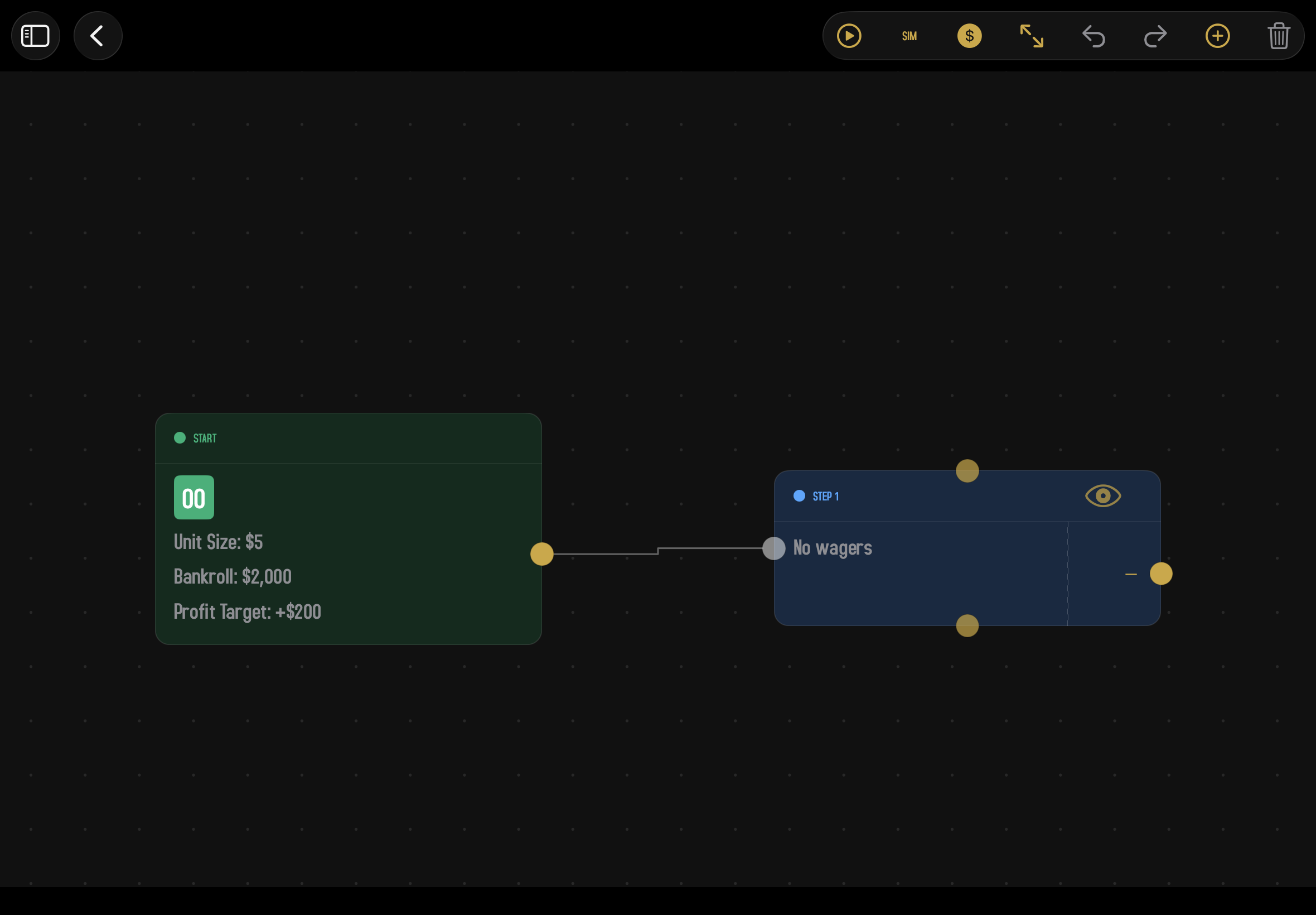
Need to change anything about the Start node later? Double-tap it on the canvas to reopen its inspector.
Step 2 · Add a wager to the Step
Double-tap the Step to open its inspector. In the Wagers section, tap Add Wager and pick Spots from the menu.
The Wager Editor opens with a full roulette table. Tap the $1 chip in the chip tray on the left to select it, then tap the big Red bet zone on the table. A $1 chip token appears on Red.
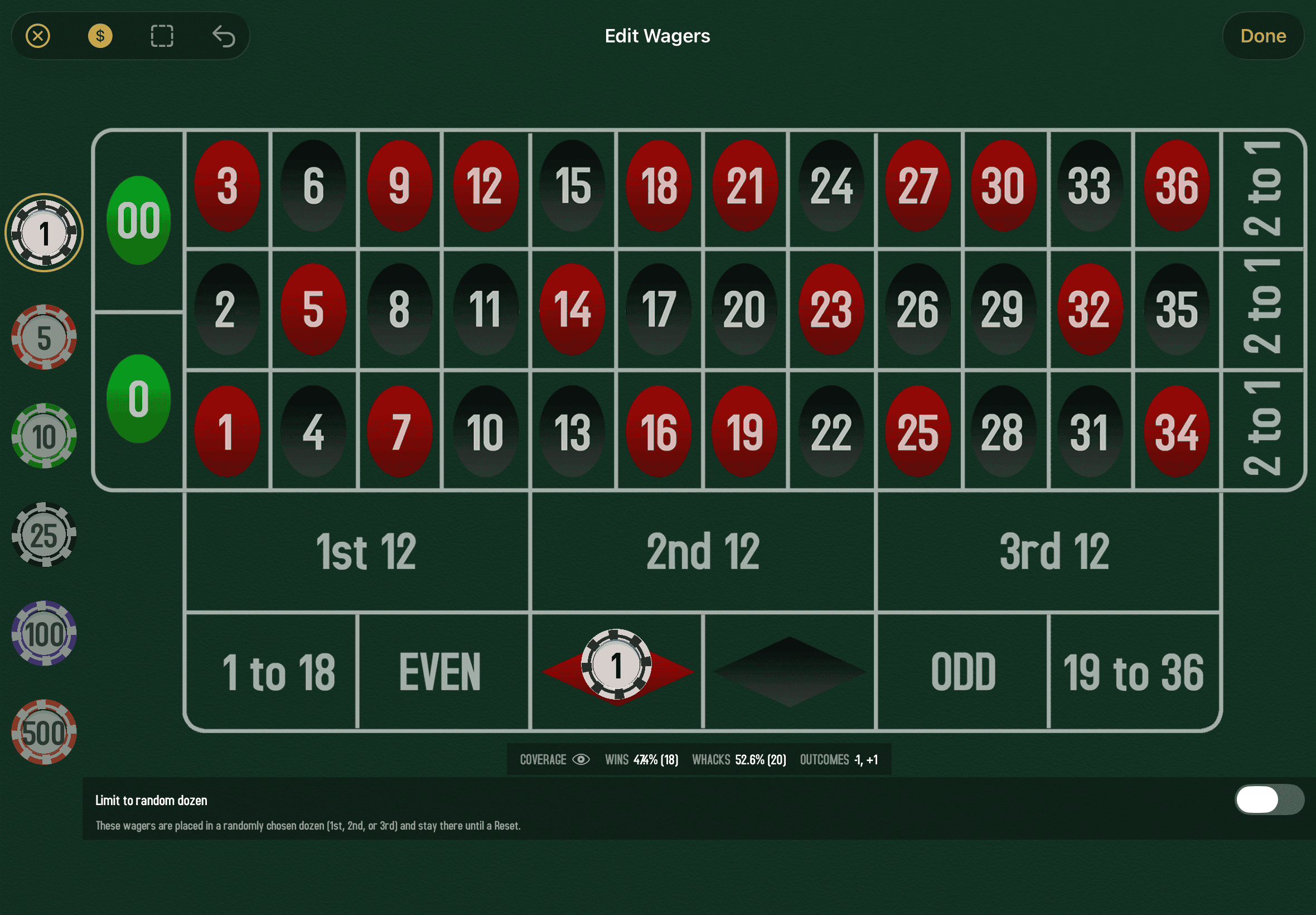
Tap Done to close the Wager Editor. Tap Done again on the Step's inspector. You should now see the Step's card display "Spots · $1 on Red" or similar.
More importantly: the Step now has two output ports on its right edge. One is labeled +$1 (you won) and one is labeled −$1 (you lost). The Step grew taller to fit them.
Step 3 · Wire up the win path
If you win, you want the strategy to start over: same bet, same Step, again. So the +$1 output should loop back to the same Step's input.
- Touch and hold the +$1 output port on the Step.
- Drag a line back to the Step's own input port (left edge of the same node).
- When it highlights, release.
You've created a self-loop. After a winning spin, execution comes back to this Step and runs again.
Step 4 · Add the Martingale Action
If you lose, the Martingale says "double the bet and try again." That's an Action node.
- Tap the + button on the toolbar.
- Pick Action Node, then Martingale from the submenu.
- An amber Martingale node appears on the canvas. Drag it somewhere convenient, maybe below the Step.
Double-tap the Martingale node to confirm its settings:
- Multiplier: ×2 (the classic Martingale). Use the stepper to pick any whole number from 2 up.
- Direction: Escalate (×2). We want to grow the bet after a loss.
- Do not apply to winning wager: Off.
Tap Done.
Step 5 · Wire up the loss path
Now connect the Step's loss output to the Martingale, and the Martingale's output back to the Step.
- Drag from the Step's −$1 output port to the Martingale node's input port.
- Drag from the Martingale node's output port back to the Step's input port.
Now you have a working loop: lose, double, retry. Lose again, double again, retry. And so on, until you win.
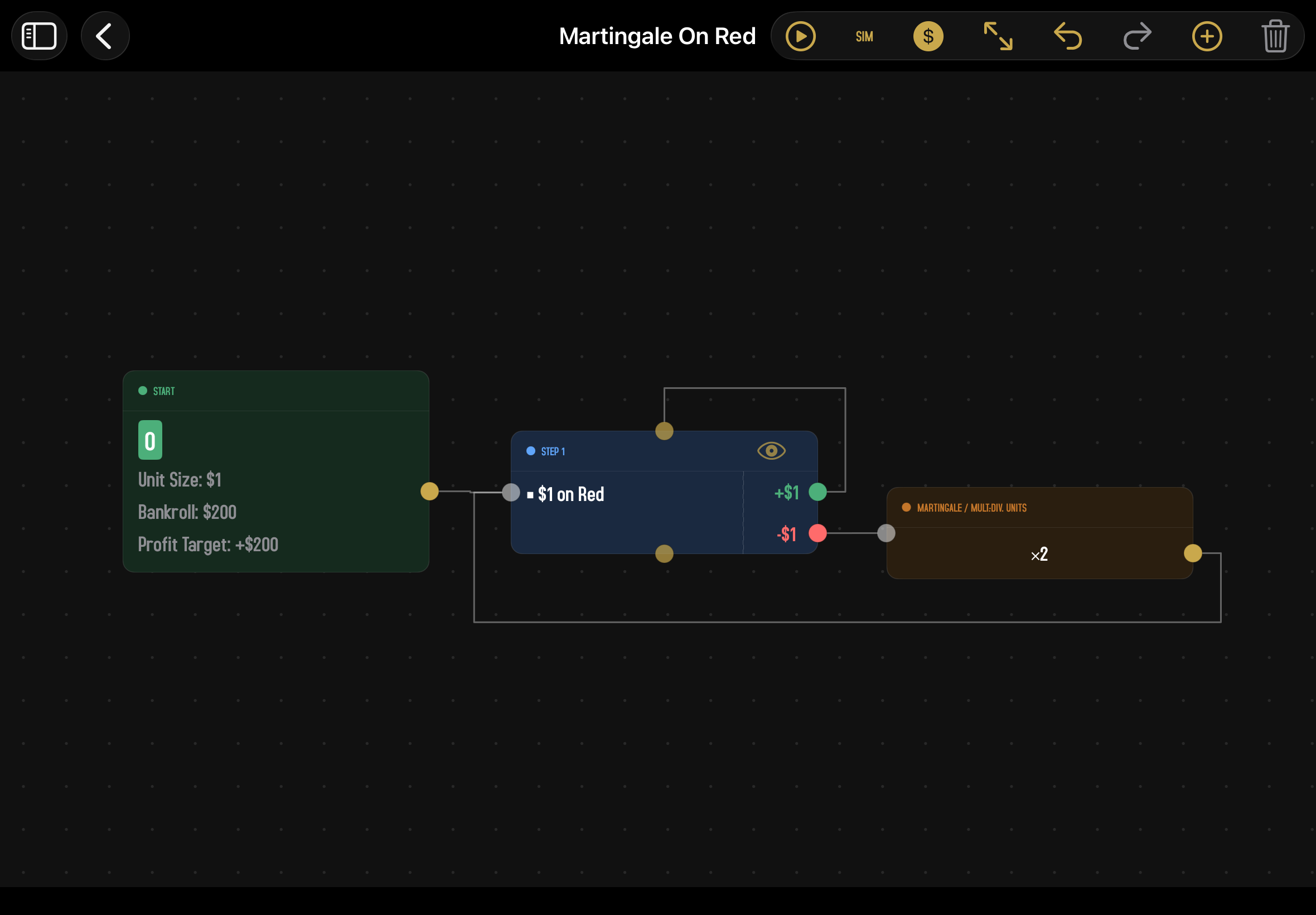
A more careful Martingale would add a Decision node that checks "Bankroll > some threshold?" before each loop and routes to an End node if not. We're skipping that here to keep this tour short. Once you've built this one, that's a good next exercise.
Step 6 · Run a simulation
Time to see how it does. Tap the Sim button on the toolbar.
The simulation setup screen opens. Most fields are pre-filled from your Start node. Set Total Sessions to a generous number (50 if you're a subscriber, the cap if you're not) and tap Start Sim.
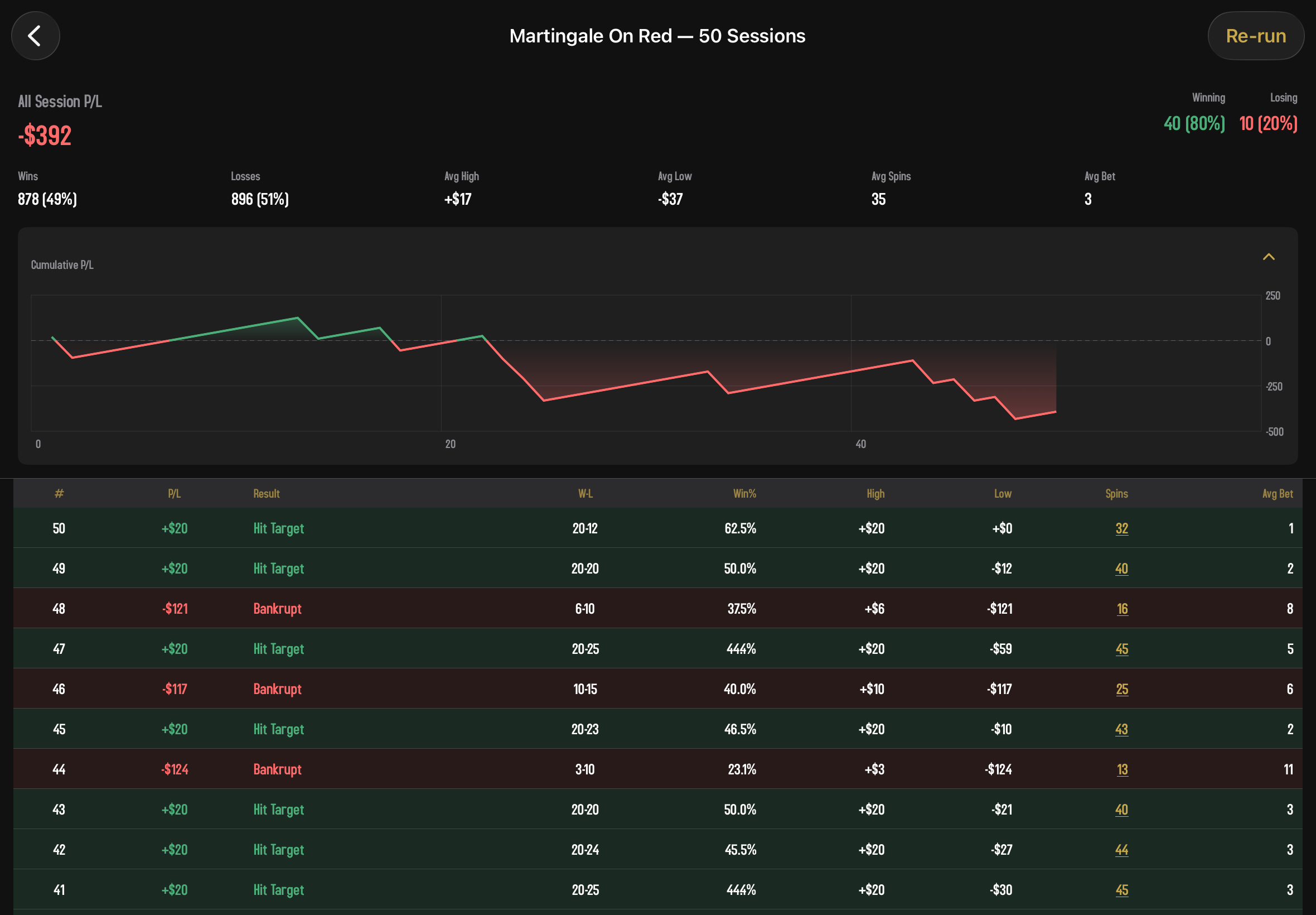
A few seconds later, you'll see the results: a chart of how the bankroll moved through one of the runs, plus a spin-by-spin log. Browse around. Tap Re-Sim to run it again.
What you'll learn
Run the simulation 10 or 20 times. You'll start to see a pattern:
- Most sessions slowly inch upward, hitting the profit target.
- Occasionally, a session crashes hard. Those are the runs where a long losing streak hit, the bet sizes ballooned, and the bankroll ran out mid-progression.
- Over many sessions, the average is negative. The wins are small and frequent; the losses are rare and catastrophic, and the catastrophic losses outweigh the steady gains.
This is the Martingale's fundamental flaw, and it's exactly why no betting system can beat roulette. The simulator is honest about it. Trust it.
Where to go from here
You've built a strategy. Some ideas for what to try next:
- Make it less risky. Add a Decision node that exits to an End node if the bet size is about to exceed some threshold. The strategy will walk away from a too-aggressive progression instead of busting out.
- Try a different progression. Replace the Martingale Action with a Fibonacci, a D'Alembert, or a Parlay. Run the same simulation. Compare the chart shapes.
- Add a side bet. Add a second Wager group to the Step (a Random Streets group, maybe) and switch the Wager Source to Extend. The Step now bets Red plus three random streets every spin.
- Browse the community. Open a community strategy and tap its Graph button to see how more elaborate strategies are wired together. There's no better way to learn than reading other people's designs.
You now know everything you need to build any strategy you can imagine. Have fun, and please keep an eye on the math: the simulator will tell you the truth.